Asset management integrates the physical, technological, contractual, and financial aspects of information technology assets.
Asset management business practices have a common set of goals.
- Control inventory that is purchased and used.
- Reduce the cost of purchasing and managing assets.
- Select the proper tools for managing assets.
- Manage the asset life cycle from planning to disposal.
- Achieve compliance with relevant standards and regulations.
- Improve IT service to end users.
- Create standards and processes for managing assets.
Most successful ITAM programs involve a variety of people and departments, including IT, finance, services, and end users.
Asset Management and configuration management (CMDB) are related, but have different goals. Asset management focuses on the financial tracking of company property. Configuration management focuses on building and maintaining elements that create an available network of services.
Asset Management Overview module:
The Asset Management Overview module displays various asset management gauges showing information such as configuration item by manufacturer, computers by manufacturer, configuration item types, and asset information for a specific vendor. It also includes a gauge showing pending asset retirements for the current week, month, and year.The Overview module is a type of homepage.
Roles
Only users with certain roles have access to the Overview module. These roles can view the overview page and refresh, add, delete, and rearrange gauges.
- admin
- asset
- sam
Asset Management process
The best method for managing assets depends on business needs and how your business is organized.
About this task
These steps are one possible process for getting started with Asset Management.
Procedure
- Identify assets in your system. A key component of asset management is the initial and ongoing inventory or discovery of what you own. The ServiceNow platform provides the following options for asset discovery.
- The separate, robust Discovery tool.
- A lightweight, native discovery tool, Help the Help Desk lets you scan your network proactively to discover all Windows-based PCs and the software packages installed on those PCs. This WMI-based discovery is included in the base self-service application.
- For organizations that want to use the discovery technologies they have deployed already, such as SMS, Tally NetCensus, LanDesk, or others, ServiceNow can support integration to those technologies via web services. Scanned data can be mapped directly into the configuration management database (CMDB).
- Clean up information in the configuration management database (CMDB). Remove information that is obsolete or invalid. Ensure that all remaining information is accurate and complete. Add any necessary information.
- Create categories of asset models such as computers, servers, printers, and software. For more info Servicenow Training
- Create asset models. Models are specific versions or various configurations of an asset, such as a MacBook Pro 17″.
- Create individual assets, such as hardware, consumables, and software licenses. If you used a discovery tool, you may already have many assets identified accurately.
- Manage assets by counting software licenses, viewing assets that are in stock, setting asset states and substates, and analyzing unallocated software.
Asset classes:
The default asset classes are Hardware, Software License, and Consumable. These general classes can be used to manage a variety of assets.
If the general classes are not appropriate for a specific group of assets, consider creating a new asset class. For example, a fleet of cars could be tracked in a custom asset class named Vehicle. Before creating new asset classes, analyze business needs to see if the general classes can be used. A large number of asset classes can be difficult to maintain.
Built-in functionality allows you to use asset classes for financial tracking, in a model bundle, and as a pre-allocated asset.
Create an asset class:
Creating a new asset class requires defining a new table and creating a corresponding application and module, then adding the new asset class to new or existing model categories.
Create an asset class:
Creating a new asset class requires defining a new table and creating a corresponding application and module, then adding the new asset class to new or existing model categories.
Before you begin
Role required: asset or category_manager
About this task
Ensure that the model categories contain models. Use the Table Creator to extend an existing table. Get more additional details from Servicenow Certification
Procedure
- Navigate to System Definition > Tables & Columns and scroll to the bottom of the page.
- Fill in the Table Creator fields with information about the new table.
For example, to extend the alm_asset table with a new table named u_vehicle and add a new application named Vehicle, fill out the Table Creator fields with the following information.
| Field | Value |
| Label | Enter Vehicle. |
| Table name | Check that u_vehicle has been added to the field automatically. |
| Extends base table | Select alm_asset. |
| Create new application | Check that the Named check box is selected and that Vehicle has been added to the text box automatically. |
| Create new module | Check that the In application check box is selected and select Asset Management. |
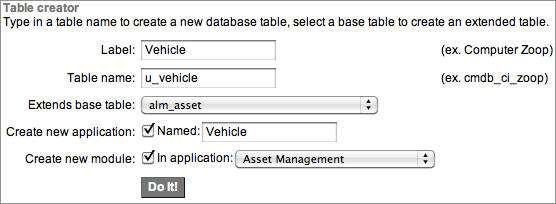
- Click Do It!.
- Navigate to the new application (for example, Asset Management > Vehicle) and click New.
- Configure the form to include Model, Model Category, and Quantity.
- Create a model category and add the asset class you created to the Asset class field.
- Create new models and add them to the model category.
Asset and CI management
Asset and Configuration Item (CI) management refers to creating assets, setting states and substates for assets and CIs, mapping assets and CIs so that they are in synch, managing consumables, and retiring assets.
Relationship between asset and CI
It is important to manage the relationship between assets and associated CIs. Assets are tracked with the Asset Management application, which focuses on the financial aspects of owning property. Configuration items are stored in the CMDB, which is used to track items and make them available to users.
When an asset has a corresponding configuration item, the asset record and the configuration item record are kept synchronized with two business rules.
- Update CI fields on change (on the Asset [alm_asset] table)
- Update Asset fields on change (on the Configuration Item [cmdb_ci] table)
Note: Assets and CIs can be synchronized only if they are logically mapped.
Asset-CI mapping and synchronization
The State field of asset record and Status field of CI record are synchronized so that changes made on one form trigger the same update on the corresponding form, ensuring consistent reporting.
Note: The ServiceNow platform synchronizes updates between assets and configuration items only if the asset and configuration item are pointed toward each other.
The following diagram illustrates the concept of Asset-CI mapping and synchronization.Asset-CI mapping and synchronization:

To get in-depth knowledge, enroll for a live free demo on Servicenow Online Training
 Mulesoft Online Learning