Top Python ETL Tools (aka Airflow Vs The World)

ETL is the heart of any data warehousing project. Any successful data project will involve the ingestion and/or extraction of large numbers of data points, some of which not be properly formatted for their destination database. Luckily for data professionals, the Python developer community has built a wide array of open source tools that make ETL a snap.

Develop your first ETL job in Python using bonobo - Python ...

We’ve put together a list of the top Python ETL tools to help you gather, clean and load your data into your data warehousing solution of choice. Some of these packages allow you to manage every step of an ETL process, while others are just really good at a specific step in the process. Either way, you’re bound to find something helpful below.

Airflow

Originally developed at Airbnb, Airflow is the new open source hotness of modern data infrastructure. While it doesn’t do any of the data processing itself, Airflow can help you schedule, organize and monitor ETL processes using python. Airflow’s core technology revolves around the construction of Directed Acyclic Graphs (DAGs), which allows its scheduler to spread your tasks across an array of workers without requiring you to define precise parent-child relationships between data flows.

It comes with a handy web-based UI for managing and editing your DAGs, but there’s also a nice set of tools that makes it easy to perform “DAG surgery” from the command line. Airflow is highly extensible and scalable, so consider using it if you’ve already chosen your favorite data processing package and want to take your ETL management up a notch. Learn more skills from ETL Testing Training

Spark

As long as we’re talking about Apache tools, we should also talk about Spark! Spark isn’t technically a python tool, but the PySpark API makes it easy to handle Spark jobs in your Python workflow. Spark has all sorts of data processing and transformation tools built in, and is designed to run computations in parallel, so even large data jobs can be run extremely quickly. It scales up nicely for truly large data operations, and working through the PySpark API allows you to write concise, readable and shareable code for your ETL jobs. Consider Spark if you need speed and size in your data operations.

petl

petl is a Python package for ETL (hence the name ‘petl’). Similar to pandas, petl lets the user build tables in Python by extracting from a number of possible data sources (csv, xls, html, txt, json, etc) and outputting to your database or storage format of choice. petl has a lot of the same capabilities as pandas, but is designed more specifically for ETL work and doesn’t include built-in analysis features, so it might be right for you if you’re interested purely in ETL.

Panoply

While Panoply is designed as a full-featured data warehousing solution, our software makes ETL a snap. Panoply handles every step of the process, streamlining data ingestion from any data source you can think of, from CSVs to S3 buckets to Google Analytics.

pandas

If you’ve used Python to work with data, you’re probably familiar with pandas, the data manipulation and analysis toolkit. If not, you should be! pandas adds R-style dataframes to Python, which makes data manipulation, cleaning and analysis much more straightforward than it would be in raw Python. As an ETL tool, pandas can handle every step of the process, allowing you to extract data from most storage formats and manipulate your in-memory data quickly and easily. When you’re done, pandas makes it just as easy to write your data frame to csv, Microsoft Excel or a SQL database.

Bubbles

Bubbles is a popular Python ETL framework that makes it easy to build ETL pipelines. Bubbles is written in Python, but is actually designed to be technology agnostic. It’s set up to work with data objects–representations of the data sets being ETL’d–in order to maximize flexibility in the user’s ETL pipeline. If your ETL pipeline has a lot of nodes with format-dependent behavior, Bubbles might be the solution for you. The github repository hasn’t seen active development since 2015, though, so some features may be out of date. Get more info from ETL Testing Course

Bonobo

Bonobo is a lightweight, code-as-configuration ETL framework for Python. It has tools for building data pipelines that can process multiple data sources in parallel, and has a SQLAlchemy extension (currently in alpha) that allows you to connect your pipeline directly to SQL databases. Bonobo is designed to be simple to get up and running, with a UNIX-like atomic structure for each of its transformation processes. This library should be accessible for anyone with a basic level of skill in Python, and also includes an ETL process graph visualizer that makes it easy to track your process.

Luigi

Luigi is an open source Python package developed by Spotify. It’s designed to make the management of long-running batch processes easier, so it can handle tasks that go far beyond the scope of ETL–but it does ETL pretty well, too. Luigi comes with a web interface that allows the user to visualize tasks and process dependencies. It’s conceptually similar to GNU Make, but isn’t only for Hadoop (although it does make Hadoop jobs easier). Luigi might be your ETL tool if you have large, long-running data jobs that just need to get done.

Odo

Odo is a Python package that makes it easy to move data between different types of containers. Once you’ve got it installed, Odo provides a single function that can migrate data between in-memory structures (lists, numpy arrays, pandas dataframes, etc), storage formats (CSV, JSON, HDF5, etc) and remote databases such as Postgres and Hadoop. Odo is configured to use these SQL-based databases’ native CSV loading capabilities, which are significantly faster than approaches using pure Python. One of the developers’ benchmarks indicates that Pandas is 11 times slower than the slowest native CSV-to-SQL loader. If you find yourself loading a lot of data from CSVs into SQL databases, Odo might be the ETL tool for you.

etlalchemy

etlalchemy is a lightweight Python package that manages the migration of SQL databases. The project was conceived when the developer realized the majority of his organization’s data was stored in an Oracle 9i database, which has been unsupported since 2010. etlalchemy was designed to make migrating between relational databases with different dialects easier and faster. A word of caution, though: this package won’t work on Windows, and has trouble loading to MSSQL, which means you’ll want to look elsewhere if your workflow includes Windows and, e.g., Azure.

mETL

mETL is a Python ETL tool that will automatically generate a Yaml file for extracting data from a given file and loading into A SQL database. Somewhat more hands-on than some of the other packages described here, but can work with a wide variety of data sources and targets, including standard flat files, Google Sheets and a full suite of SQL dialects (including Microsoft SQl Server). Recent updates have provided some tweaks to work around slowdowns caused by some Python SQL drivers, so this may be the package for you if you like your ETL process to taste like Python, but faster.

Open Semantic ETL

Open Semantic ETL is an open source Python framework for managing ETL, especially from large numbers of individual documents. The framework allows the user to build pipelines that can crawl entire directories of files, parse them using various add-ons (including one that can handle OCR for particularly tricky PDFs), and load them into your relational database of choice.

Mara

Mara is a Python library that combines a lightweight ETL framework with a well-developed web UI that can be popped into any Flask app. Like many of the other frameworks described here, Mara lets the user build pipelines for data extraction and migration. Mara uses PostgreSQL as a data processing engine, and takes advantages of Python’s multiprocessing package for pipeline execution. The developers describe it as “halfway between plain scripts and Apache Airflow,” so if you’re looking for something in between those two extremes, try Mara. Note: Mara cannot currently run on Windows.

riko

While riko isn’t technically a full ETL solution, it can handle most data extraction work and includes a lot of features that make extracting streams of unstructured data easier in Python. The tool was designed to replace the now-defunct Yahoo! Pipes web app for pure Python developers, and has both synchronous and asynchronous APIs. riko has a pretty small computational footprint, native RSS/Atom support and a pure Python library, so it has some advantages over other stream processing apps like Huginn, Flink, Spark and Storm. If you find yourself processing a lot of stream data, try riko.

Carry

Carry is a Python package that combines SQLAlchemy and Pandas. It’s useful for migrating between CSVs and common relational database types including Microsoft SQL Server, PostgreSQL, SQLite, Oracle and others. Using Carry, multiple tables can be migrated in parallel, and complex data conversions can be handled during the process. One of Carry’s differentiating features is that it can automatically create and store views based on migrated SQL data for the user’s future reference.

locopy

The team at Capital One Open Source Projects has developed locopy, a Python library for ETL tasks using Redshift and Snowflake that supports many Python DB drivers and adapters for Postgres. Locopy also makes uploading and downloading to/from S3 buckets fairly easy. If you’re looking specifically for a tool that makes ETL with Redshift and Snowflake easier, check out locopy.

etlpy

etlpy is a Python library designed to streamline an ETL pipeline that involves web scraping and data cleaning. Most of the documentation is in Chinese, though, so it might not be your go-to tool unless you speak Chinese or are comfortable relying on Google Translate. etlpy provides a graphical interface for designing web crawlers/scrapers and data cleaning tools. Once you’ve designed your tool, you can save it as an xml file and feed it to the etlpy engine, which appears to provide a Python dictionary as output. This might be your choice if you want to extract a lot of data, use a graphical interface to do so, and speak Chinese.

pygrametl

pygrametl is another Python framework for building ETL processes. pygrametl allows users to construct an entire ETL flow in Python, but works with both CPython and Jython, so it may be a good choice if you have existing Java code and/or JDBC drivers in your ETL processing pipeline.

TO get in-depth knowledge, enroll for a live free demo on ETL Testing Online Training

Apigee vs Mulesoft: What’s the difference?

The market for API management platforms is growing rapidly, and all of the major technology vendors want a piece. At the top of the heap are Google’s Apigee and Salesforce’s Mulesoft, but what’s the difference between the two?

As part of Computing Delta’s ongoing research into Apigee vs Mulesoft and other API management services, our research team has been asking senior IT professionals about their preferences to help you answer the question…

Which API management technology vendor should I use?

Computing Delta conducted a two-month analysis of this market, with interviews with IT leaders who are have used these services.

This is available to Delta subscribers; click here if you do not have access but would like to see the full report in a demo. More information, including comparisons with other vendors, is available in the APIs Special Report, and in this video interview with IT leaders at Mars and Starling Bank. If you are looking to make an API management platform comparison, this article provides a brief summary of two of the market leaders, Apigee vs Mulesoft Training

Apigee vs Mulesoft – the background

Apigee was founded in 2004 as Sona Systems, and rebranded in 2010. Google acquired it in 2016 for $625 million, at a time when Apigee was generating less than $100 million in revenue ($68.6 million in 2015, $92 million in 2016). Reports indicate that the acquisition was intended as a stepping stone to bring new customers to Google Cloud, rather than to add API hosting capabilities to the search giant’s offering.

The company is still relatively small, with fewer than 500 employees. Google does not break out its financial results separately from the rest of Google Cloud Platform.

MuleSoft is a US company with more than 1,100 employees, headquartered in San Francisco. Salesforce acquired the firm in 2018 for $6.5 billion – the largest deal in its history, although one that attracted criticism. However, Mulesoft performed ahead of expectations in Q4 2018, with revenue of $181 million (of which $156 million was service and support revenue), and $431 million over the course of 2018: a 45 per cent YoY increase.

Purely in terms of revenue, Apigee vs Mulesoft seems to place the latter as a firm winner. But revenues do not tell the whole story.

API products

APIs drive many modern services, and enable companies to draw on skills they may not have internally. Simply put, they enable two applications to talk to each other by sending and receiving data. Rather than spending time and effort to develop their own payments platform, a firm could simply pay a fee and paste a few lines of code to get something built by experts. An apt analogy is that of a plug socket: this provides a universal connection for a product (an electrical appliance) to connect to a service (the electricity flow). Learn more skills from Mule Training

The number of APIs firms use is constantly growing as they add new applications and services to their infrastructure, creating a complex web of connections. API calls (customers using the APIs to access a service) also rise over time. This makes management platforms key to a successful installation.

An API management platform serves as a proxy for customer requests. It limits the number of queries each customer can send, and ensures that a high number of queries – either sent maliciously or unintentionally – does not crash a service.

In terms of management platforms, Apigee produces Apigee Edge and Mulesoft customers use the Anypoint Platform. Both are full lifecycle management tools: in addition to query management they have advanced features like analytics; runtime management; developer portals; and ways to plan, build, roll out and retire APIs.

What is Apigee Edge?

Apigee Edge is a single platform for API management, developer services and analytics. Functions include API design, security, publishing, monitoring and monetisation, as well as microservice management. Users praised the analytics functionality, but were sceptical about the use of Swagger, which developers may need to learn to work with the tool. Apigee also provides related services like Apigee-127, which developers can use to design and build enterprise-class APIs in Node.js and deploy them on any Node.js system.

The solution is available both on-premises and in the cloud (Apigee supports public, private, hybrid and multi-cloud), although respondents said that the cloud version is both cheaper and easier to install.

What is Mulesoft’s Anypoint Platform?

Mulesoft created the Anypoint Platform by merging API management into its Mule integration platform in 2013. Although this can be an attractive proposition, companies that already have an integration platform may find the Anypoint Platform too much for them. To address this, Mulesoft launched a standalone API management product (see ‘Anypoint Platform – API Management Solution’) in 2018.

The company has continued to iterate on the platform, and users are now able to combine internal services and third-party APIs. With the October 2019 release Mulesoft began trialling a new microservices service mesh (Anypoint Service Mesh), for customers to ‘discover, manage and secure any service deployed to Kubernetes’. This brings the Anypoint Platform’s functionality even closer to its rival in the Apigee vs Mulesoft battle.

Mulesoft focuses on helping customers speed up their digital transformations. Thanks to its integration-focused past, the Anypoint Platform has several pre-built connectors for systems including SAP, AWS and Salesforce. These make integration a fast process, but can be limiting: Apigee customers said that they write their own connectors, and in practice found this less restrictive than worrying about whether there was a pre-built connector for a system.

Like Apigee Edge, the Anypoint Platform can run on-premises, in the cloud or in a hybrid deployment.

Apigee vs Mulesoft at a glance

Apigee vs Mulesoft Pricing

Neither company produces public pricing information, although they do share information on subscription plans. We also achieved some insight into pricing through our interviews with customers.

Apigee subscriptions are divided into four tiers, ranging from the free Evaluation tier (one user, one environment; 100,000 API calls a month; 30 days of analytics reports) to the Enterprise tier (10 organisation/environment combinations; 10 billion API calls a year; 12 months of reports). Users nearly unanimously mentioned the high cost, but said that it is worth paying for the value and functionality gained.

Mulesoft pricing is divided into three tiers: Gold, Platinum and Titanium. All three cover base functionality like management, API design and ‘unlimited’ API portals. Connectors require an additional premium. The Platinum and Titanium tiers include enterprise features like external identity management and business groups. Advanced data analytics, log management and end-to-end transaction tracing are limited to the Titanium tier. There are no perpetual licenses with Mulesoft; all models are priced on an annual subscription basis.

To get in-depth knowledge, enroll for a live free demo on Mulesoft Online Training

Kibana vs. Tableau: What’s the Difference?

An abundance of data is present within the organizations but making the best out of it remains a challenge. Data visualization has helped to reduce this issue to a great extent.

Data visualization tools, with their competitive features, have brought a great deal of advancement in the data industry.

Kibana and Tableau are few of the popular tools that have helped in solving the issue of understanding the complex data in a much more detailed manner.

Kibana helps in the analysis of data and representing the same analysis in the form of visualization.

Features like interactive charts, anomaly detection, and secure sharing, helps users to interact with the data in a much more professional manner.

Tableau, is compatible universally, which means that unlike Kibana it needs not to be dependent on other platforms for connecting with data.

Moreover, customization and deploying compared to any other tools can be done effortlessly here. Get more info Tableau Training

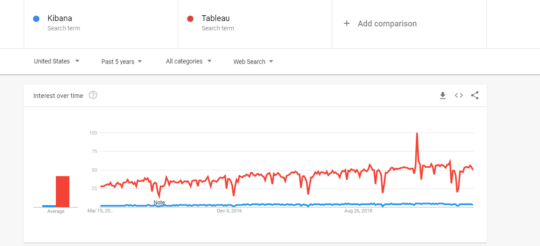
Kibana vs Tableau: Which is More Popular?

Kibana vs Tableau Which is More Popular

From the above, it can be evaluated that Tableau is stepping ahead in comparison to Kibana in terms of customer preferences.

Kibana vs. Tableau: Difference Across 5 Features

Working of Kibana and Tableau

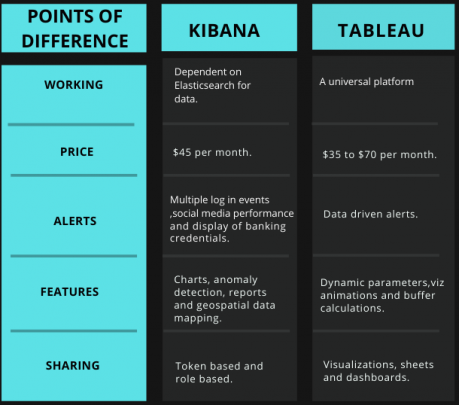
Kibana is an open-source and visualization tool that is dependent on the Elasticsearch for the data, which are stored as indexes within it.

For interacting with the data, Kibana has to interact with the information that gets stored as indices in Elasticsearch.

Kibana is merely a visualization tool meaning that the data has to be fed to it so that the same can be explained in visual patterns.

For this Elasticsearch is used wherein interaction happens between the data stored as indices and kibana.

Tableau has the ability to extract the data from any platform. This data is directly moved towards the data engine of Tableau Server Training

Data analyst works here on the data and presents the same in pictorial forms. The data after the analysis is presented to users in statistic forms.

Price

Kibana, on its own, is free to use.

However, to take the best from the Kibana, one has to combine it with Elasticsearch. It offers its services in Elastic Cloud starting at the price of $45.00/month.

Tableau has unveiled their latest prices as under:

  • Tableau Desktop Personal – $35 per month.
  • Tableau Desktop Professional – $70 per month.
  • Tableau Server – $35 per month.
  • Tableau Online – $42 per month.

Alert Process in Both Tools

Alerts in the Kibana happens under the following conditions:

  • Multiple log in events – Same person logging in from multiple places.
  • Social media performance – If the demands for trending products are not being met.
  • Display of banking credentials – If credit card numbers are visible within the logs.

Also, Kibana allows its users to get notified on email, PagerDuty, Slack, and HipChat.

However, in Tableau, data-driven alerts automatically send alerts to key people specified for that alert.

For Tableau online, live data sources are evaluated after every 60 minutes.

Users have the option of even adding themselves to the alerts created by others.

Site administrators can easily enable or disable the alerts and even make the changes to it accordingly.

Key Features

Listed below are some of the key features in Kibana:

  • Interactive charts.
  • Detection of irregularity in data.
  • Multiple search options like field-level search, logical statement, free text searches, and proximity searches.
  • Geospatial data mapping.
  • Reports.

Following are the key features that Tableau has to offer:

  • Dynamic Parameters – Forget about the regular updates in parameters. Set it once and Tableau will update it automatically.
  • Viz animations – Helps users to understand the changes in the data.
  • Buffer calculations – Users can understand the data on parameters like location, distance, and measurement units.
  • Multiple data source connections – Extract the data from multiple data platforms.
  • Mobile-friendliness – Users would be able to view visualizations in their mobile phones as well. Get more from Tableau Server online Training

Data Sharing Procedure

Tokens are needed to share the data in Kibana.

Not only this, but the role-based sharing is also provided in Kibana.

The main motive behind this is to restrict any information to a particular set of members only.

In tableau, users can, however, share the data in the form of visualizations, sheets, and dashboards.

Users can share data from various sources like on-premises or on any cloud network.

Kibana vs. Tableau Comparison Via Tabular Diagram

Kibana vs Tableau Comparison Via Tabular Diagram

Can Tableau be Connected to Elasticsearch?

Yes, Tableau can be connected with Elasticsearch for visualizing the data. Since Tableau can be connected to any data source, Elasticsearch is no exception and can easily be added with Tableau for visualization purposes.

Reports can be generated with the help of the Tableau for Elasticsearch data.

Once Elasticsearch is added as a data source, the data then needs to be mapped to the Tableau.

Tableau now would be able to analyze the data and also will provide the option of visualizing the same.

To get in-depth knowledge, enroll for a live free demo on Tableau online Training

Salesforce and Tableau: How they can better serve customers together

Salesforce is spinning its mega acquisition of Tableau Software as the number-one CRM vendor buying the number-one business intelligence (BI) and analytics vendor. It’s a big deal that was likely hastened by last week’s acquisition of Looker by Google. In the short term, it will give Salesforce more revenue, but in my view, the success and ultimate value of the proposed $15.7 billion deal will depend on what Salesforce and Tableau can do together and whether Tableau can accelerate its move into the cloud.

Tableau fills a competitive gap for Salesforce that Einstein Analytics hasn’t filled. Einstein Analytics (which originated as Salesforce Wave Analytics in 2014) is still very new, and it’s not widely adopted by Salesforce customers. What’s more, Einstein Analytics has been largely aimed at CRM-centric analytic needs, whereas Tableau gives it broad, multi-purpose analytical capabilities that are already widely adopted and highly regarded. For more skills Tableau training

A key challenge, however, is that only one third of Tableau customers, at best, are running in the cloud. So either Tableau has to accelerate its move into the cloud or Salesforce has to develop more of a hybrid strategy. The latter would go against Salesforce’s longstanding “no software” ethos, although even cloud player Amazon Web Services (AWS) has made accommodations for on-premises deployments in recent years.

salesforce-tableau.jpg

One thing that Salesforce and Tableau have in common (other than tens of thousands of customers) is Microsoft as a formidable rival. Microsoft goes after Salesforce primarily with Microsoft Dynamics 365 and it goes up against Tableau primarily with Power BI. In both cases, Microsoft stresses its broader platform, including Office 365, Azure, the LinkedIn graph, and its broad data-management portfolio, but the real weapon on both fronts is the blunt instrument of competitive pricing. Microsoft effectively discounts its CRM and analytics offerings knowing it can count on long-term benefits, stickiness and profits from each customer and byte of data that ends up on Azure.

Competing against Microsoft Power BI is one thing, but cloud competition is about to get tougher with Google’s acquisition of Looker, announced last week. And with both Google and Microsoft now strongly pursuing the BI and analytics market, it likely won’t be long before AWS steps up its game from its current, less-than-competitive QuickSight offering. Get more skills from Tableau Server Training

Tableau needed a deep-pocketed parent to help it compete against these new competitors. A key area of investment important to both Salesforce and Tableau is augmented analytics and artificial intelligence (AI). Microsoft has been adding augmented capabilities to Power BI, and it highlights the connection to the rest of its AI portfolio. Leveraging one set of AI and augmented analytics investments across Salesforce and Tableau should provide economies of scale that will help both parties innovate.

MYPOV ON HOW TO BETTER SERVE CUSTOMERS TOGETHER

I appreciate that Salesforce is promising to maintain Tableau as an independent business, just as it did when it acquired Mulesoft last year. Salesforce is far better than most companies at retaining the leadership, talent and values of the companies it acquires. A big part of Tableau’s strength has been its culture, and I see Salesforce as more likely than any other suitor to retain that energy.   

As I noted above, investments in AI and augmented analytics are an obvious place to start on future innovation. But with trends moving toward low-latency demands and predictive and prescriptive recommendations, I see analytics as destined to be more frequently embedded into applications. Not just OEM apps, but software apps that customers build themselves. Salesforce and the Force.com platform are both good fits for accelerating Tableau’s embedding strategy. Microsoft is pursuing these trends with its Power Apps, Flow and Power BI Embedded capabilities, and Salesforce and Tableau would do well to exploit their strengths.

As for how Salesforce and Tableau could improve and take advantage of integration, a few areas should be addressed to better serve customers. For starters, Tableau must evolve its self-service strengths and provide more tools and controls for centralized governance. The company started down this path a few years ago with data-certification capabilities, and it’s expected to add a data catalog this year.

Salesforce and Tableau together could do more to address centralized data modeling, ensuring reusability and a single version of the truth. Here’s where Looker has strengths, offering an old-school semantic modeling environment built for modern cloud data architectures.Learn more skills from Tableau Server Online Training

The addition of Tableau also raises questions anew for Salesforce as to how deeply it will invest in data-management capabilities. Last year’s Mulesoft deal upped Salesforce API-oriented integration capabilities, but AWS, Google and Microsoft offer end-to-end database, data warehouse, data integration and high-scale data platform capabilities that give customers one-stop-shop opportunities while also fueling AI capabilities. Salesforce has to decide whether to take a Switzerland approach — working with all the major clouds and third-party vendors — or whether it’s going to also offer its own data platforms and services. Perhaps it could choose a middle ground by focusing exclusively on analytics, acquiring, say, Snowflake, and perhaps a bit more in the way of big data and data integration capabilities.

These are interesting times, and I am hearing echoes of the BI and analytics consolidation that happened just over a decade ago. There is a danger that history could repeat itself, as when BusinessObjects, Cognos and Hyperion were acquired in 2007/2008 by SAP, IBM and Oracle, respectively. Back then, many predicted that these massive consolidators would push independents out of business, but that’s not what happened. That’s exactly when Tableau, Qlik, Spotfire and other innovators emerged and it was mostly downhill from there for the incumbents.

The lesson for Salesforce is that it can’t count on the power of its platform to retain and win new Tableau customers; the product must remain competitive on its own merits, and that will require investment and the spark of innovation that got Tableau where it is today.

To get in-depth knowledge, enroll for a live free demo on Tableau Online training

Tableau Data Visualization and tools

What is Tableau?

Do you know what is Tableau? Tableau is a wonderful data visualization tool which is more commanding and wildest concept utilized in the industry called Business Intelligence. Using this effective tool, you can simplify the uncooked data into the effortlessly logical format with null coding familiarity and technical skills.

Best of the Tableau Web: New bloggers and the latest data tips ...

You can make a very quick analysis of data using Tableau and the visualizations created are displayed in the form worksheets and dashboards. Any level of professional in a company can understand the data through Tableau. Even a non-technical user can simply create a customized dashboard. Tableau permits the users to deploy data, alter calculations and modify situations in actual time.

We can see three major differences in Tableau when compared to Excel which is modifying the source of data when functioning, enabling to manage boundless data, and allowing to create collaborative dashboards. For more info Tableau Training

Data Visualization in Tableau

Data visualization handled through Tableau is most important because we as human beings are good at understanding the concepts and things when described visually. A flawless combination of appealing elements like magnitudes, colors, and markers can produce a visual masterwork and such work would help any business to come up with an idea and end up in knowledgeable verdicts.

Easily digestible visuals will enable you to access any amount of data. I hope you all are aware that fine-tuned and designed graphics are typically the meekest and the most influential method for presenting any kind of data.

We can see more data sources are getting exposed in today’s trend, and that is why most of the business managers are looking for commendable data visualization software to examine trends visually. Many data analysis experts are recommending the beginners to follow this method consistently to get more and more Tableau job opportunities in 2020.

Why Tableau?

A Tableau is a  software that helps to understand the patterns in the data and provide a visual representation of them. This idea itself is fascinating because the human brain is wired in a way to understand visual patterns better than any boring, old statistical data or lengthy presentations.

Tableau analysts need to understand the patterns in the data and derive meaningful insights from the data and use statistics to represent data and clarify their findings to the business people who do not have much technical knowledge. This needs a variety of skills such as Data Analytics, Statistics, Communication, and Business, etc.

Tableau helps nontechnical people to understand data and make data-driven business decisions to help in their organization ’s growth. Tableau is the leader among the data visualization tools and there is an increasing need for Tableau professionals across the globe. According to Gartner Magic Quadrant 2017, Tableau is the gold leader that rules the whole data visualization market. Learn more from Tableau Online Course

People can easily observe visually presented things than written reports. Also, everyone has their own need for some analysis and analytics. Tableau software helps them with that. It is one of the leading data visualization software in the universe and key element in the data science galaxy for the presentation of output.

It is part of the analytics world, business intelligence and reporting too. Its job is simple, to visualize things but it does it well and for the attention it deserved. No hero introduction needed for a hero. LoL.

It is well known for its performance, visually simple and appealing charts. They conduct many conferences, user group meetings so often. They add small features often that are truly helpful.

Versions in Tableau

Professional and Personal are the two (2) versions in Tableau. The difference between these two versions are professional allows the users to create and store data sets in their own system, whereas in personal version, you are not allowed to store data in the local system.

Features of Tableau

We can see many features in Tableau which makes it very popular and important for a business. Below are some of the key features that are highly utilized in most of the companies. You need to check in what ways the below-mentioned features can help you in increasing your Tableau job opportunities in 2020.

  • Dashboard commenting
  • Dashboard Sharing
  • Data Notifications
  • Metadata Management
  • Server Rest API
  • Automatic Updates
  • Translating queries to visualizations
  • Mobile-friendly dashboards
  • Creation of no-code data queries
  • Embed dashboards
  • Drag-drop and Toggle view
  • Security Permissions at any point of the level

Features Embedded in Tableau

If you are ready to proceed with your career in Tableau technology, you need to know the below features embedded in Tableau for better opportunities in 2020.

Subscribe to others:

Users can select the names from their wish list and provide the subscription to view their dashboards with a single click.

Document API:

To operate the files like .tds and .twb, a new document API in Tableau affording a supported path. You can create a template book and deploy it across multiple databases and servers. Learn more from Tableau Server Training

Licensing View:

A new body view is included in Tableau where you can view the licensing and practice of Tableau Desktop.

Internet Information Connotation Two:

Build supplementary multipurpose and influential connectors with the online information connotation two. This version supports numerous joins and tables.

Rest API Enhancements:

REST API in Tableau has been inflamed with additional data decisions, and the volume to return the Tableau Server version.

List of Tableau tools

We all are aware that Tableau is the quickest method for data analysis. To make the operations easier with Tableau, we need to focus on different Tableau tools as well. There are two categories of tools based on the Data Analytics concept namely Sharing Tools and Developer Tools. Tools used for development purposes like the creation of dashboards, charts, visualization, and report generation are called Developer’s tools. Sharing tools are used to share dashboards, reports, and visualization which are created with the help of Developer Tools. Below is a list of Tableau tools that helps you to work more professionally every single day with Tableau.

Tableau Desktop:

This is the software version that has developed features that involve connecting to a data source, creating charts and enhancing data sets.

Tableau Desktop permits the users to code and customizes the reports with rich features. Starting from report and chart creation, ending with dashboard formation, the entire mandatory tasks are handled in Tableau Desktop. Tableau Desktop creates a connection between the innumerable types of files and Data Warehouse for live data examination.

The workbooks and dashboards created in Tableau Desktop can be shared in public or local. Tableau Desktop is further classified into two parts namely Professional and Personal, depending on the data source and publishing option connectivity.

The workbook is made private and limited access is provided in Tableau Desktop Personal, whereas the workbooks are made public through online or within Tableau server in Tableau Desktop Professional. Professional is the best option if the user desire to publish their workbook in Tableau server Online Training

Tableau Public:

Workbooks can be saved in the Tableau public but it is accessible to everyone in the public. Tableau Public is particularly constructed for profitable users. You cannot save the workbooks in your local system if created in Public. The workbook can be stored in Tableau’s public cloud that can be opened and read by anyone.

We cannot expect the privacy on the files, hence anyone can access, view, read and download the data. Users who are willing to share their data with the universal public can use this Tableau tool and for the individuals who are willing to learn Tableau.

Tableau Server:

This is for licensed users and can be used to store organization-specific data in the server. This has to be purchased and provides data privacy. Publish the workbook in the Tableau Desktop to share dashboards in the Tableau Server. When the uploading is successful to the server, only the authorized users can access the workbook.

Tableau Server is not required to be installed on the authorized user’s machine and only login authorizations are required as they can simply verify reports through the web browser. For speedy and active data sharing, Tableau server is very useful the security is also high. Organization admin is holding the whole control of the server and hence preserves the software and hardware.

Tableau Online:

This can be used to share content online and has been integrated with a lot of cloud data sources. Through Tableau Online tool, Data get stored on servers that are hosted on the cloud and maintained by Tableau group. Data published in Tableau Online has no storage limit and a direct link is created over 35 data sources such as MySQL, Amazon Aurora, Hive, Spark SQL, and so on. Data that comes out of Tableau Online or Tableau Server supports Salesforce.com and Google Analytics.

Tableau Reader:

Though we cannot modify or change the data, we can view or filter the existing workbooks using Tableau reader. Using Tableau Reader, a free tool, you can view the workbooks and visualizations created through Tableau Public or Tableau Desktop. In this reader tool, you can filter data, but cannot edit or modify. Anyone can view the workbook and hence we cannot expect security in Tableau Reader. The receiver must have Tableau Reader to read or view the documents shared by the other user.

The data analytics of Tableau can be described in two ways and they are

Sharing Tool

As the name suggests, this sophisticated tool helps in sharing dashboards, reports, visualizations, etc. that are designed by using the Developer Tool. Tableau Reader, Tableau Online, and Tableau Server are the primary Tableau products.

Developer Tool

These are the tools used for developing designs of dashboards, charts, visualizations, reports etc. Tableau Desktop and Tableau Public are the primary Tableau products.

There are diverse online institutions offering proper training to use the diverse products of Tableau. Aspiring careerists should gather information on the same and reach their career goals.

Architecture of Tableau

Tableau server is helpful in connecting numerous data tiers and truly it is possible to connect the client from various devices like Desktop, Web, and Mobile. Tableau is a multi-user, multi-process and multi-thread system that can run on both virtual and physical machines. For such a wonderful system, we need to have a unique architecture. Yes, Tableau Architecture is very powerful and contains various influential features. Below are the components of Tableau Architecture.

Data Server:

The data server is the chief component of Tableau Architecture. Multiple data sources can be connected by Tableau and blend data. Connecting databases excel files, and web application is possible at the same time.

Data Connector:

An interface is provided by Data Connector to connect Tableau Data Server with peripheral data sources. SQL/ODBC is an in-built connector of Tableau. Without the help of a native connector, any database can be connected to the ODBC connector.

Components:

There are three types of components in Tableau Server which are VizQL Server, Application Server, and Data server. VizQL server is to change the queries into visualization from the data source. An application server is helpful in providing authentications and authorizations. The data server is a central data management system, which is useful in managing and storing data from external data sources. Metadata Management, Data Storage, Data Security, Driver requirements and Data Connection are the services provided by the Data Server component.

Gateway:

Directing the requests to Tableau components from users is the process handled through Gateway. The requests are forwarded to the external load balancer while receiving client requests. If there is no external load balancer, Gateway by itself works as a load balancer.

Clients:

With the help of various clients, users can view and edit the dashboards and visualization in Tableau server. Tableau Desktop, Mobile applications, and web browsers are the different clients used over here.

To get in-depth knowledge, enroll for a live free demo on Tableau Online Training

TOP 9 ETL TOOLS FOR DATA INTEGRATION IN 2020

One of the essential aspects of data warehousing is the ETL (Extract Transform Load) tool. An ETL tool is a combination of three different functions in a single tool. One most crucial property of ETL is to transform the heterogeneous data into homogeneous one, which later helps data scientists to gain meaningful insights from the data.

ETL Tools: In-depth Guide [2020 update]

In this article, we list down the top 9 ETL tools one must use for data integration in 2020.

The list of top 9 ETL tools is in alphabetical order. learn ETL Testing Certification

Apache NiFi

Apache NiFi has been built to automate the flow of data between systems. It supports powerful and scalable directed graphs of data routing, transformation, and system mediation logic. It executes within a JVM on a host operating system. The primary components of NiFi on the Java Virtual Machine (JVM) are web servers, flow controllers, extensions, and content repository, among others. 

Some of the intuitive features include

  • Web-based user interface: NiFi provides a seamless experience between design, control, feedback, and monitoring.
  • Highly configurable: NiFi has low latency, and the flow can be modified at runtime. 

AWS Glue

AWS Glue is a fully managed serverless ETL, which is simple as well as cost-effective to categorise data and to move it between various data sources. AWS Glue consists of a central metadata repository known as the AWS Glue Data Catalog, an ETL engine that automatically generates Python or Scala code, and a flexible schedule that handles dependency resolution and job monitoring.

Some of the intuitive features include

  • AWS Glue generates ETL scripts to transform, flatten, and enrich your data from source to target.
  • It detects schema changes and adapts based on your preferences.

Informatica PowerCenter

Informatica PowerCenter is a metadata-driven data integration platform which helps in accelerating data integration projects to deliver data to businesses quickly. 

Some of the intuitive features include

  • Scalability, performance, and zero downtime: PowerCenter provides support for grid computing, distributed processing, high availability, adaptive load balancing, dynamic partitioning, and pushdown optimisation.
  • Real-time data for applications and analytics: PowerCenter provides accurate and timely data for operational efficiency, next-generation analytics and customer-centric applications.  Get more from ETL Testing Course

Infosphere Information Server By IBM

IBM InfoSphere Information Server is a data integration platform which enables a user to understand, clean, monitor, transform and deliver data. The platform provides massively parallel processing (MPP) capabilities to deliver a highly scalable and flexible integration platform that handles all data volumes, big and small.

Some of the intuitive features include

  • Integrate data across multiple systems: In this platform, one can get near real-time integration of all types of data.
  • Assess, analyse and monitor data quality: One can derive more insights from the enterprise data through integrated rules analysis on the scalable platform.

Microsoft – SQL Server Integrated Services (SSIS)

Microsoft SQL Server Integration Services (SSIS) is a platform for building high-performance data integration solutions, including extraction, transformation, and load (ETL) packages for data warehousing. SSIS includes graphical tools and wizards for building and debugging packages, tasks for performing workflow functions such as FTP operations, executing SQL statements and much more. 

Oracle Data Integrator

Oracle Data Integrator is a comprehensive data integration platform which covers all data integration requirements from high-performance batch loads, trickle-feed integration processes to SOA-enabled data services. It includes interoperability with Oracle Warehouse Builder (OWB) for a quick and simple migration for OWB customers to Oracle Data Integrator, ODI12c.

Some of the intuitive features include

  • Faster and simpler development and maintenance.
  • Data quality firewall: Oracle Data Integrator ensures that faulty data is automatically detected and recycled before insertion in the target application.

Qlik Replicate

The data integration platform at Qlik known as Qlik Replicate is a simple data integration tool which supports a variety of use cases including mainframe modernisation, Oracle to Hadoop migration, and real-time data warehousing. This platform automates the replication processes end-to-end, which include target schema generation across all major relational databases, data warehouses, and Hadoop distributions in the data centre or the cloud. 

SAS – Data Integration Studio

SAS Data Integration Studio provides a powerful visual design tool for building, implementing and managing data integration processes regardless of data sources, applications, or platforms. It enables users to build and edit data integration quickly, to automatically capture and manage standardised metadata from any source, and to easily display, visualise, and understand enterprise metadata and your data integration processes. The studio is an easy-to-manage, multiple-user environment which enables collaboration on large enterprise projects with repeatable processes that can be easily shared.

SAP – BusinessObjects Data Integrator

SAP – BusinessObjects Data Integrator helps an organisation to extract, transform, integrate and load your data in the analytical environment. With SAP BusinessObjects Data Integrator, one can easily extract data from any source, transform, format and integrate that data into almost any target database.

To get in-depth knowledge, enroll for a live free demo on ETL Testing Online Training
Getting started with MuleSoft’s SAP integration tools

MuleSoft’s SAP integration tools

SAP provides a number of elements, data structures, and modules to enable integration with its solutions. Below is a summary of the various approaches, all of which are supported by MuleSoft’s Anypoint Platform.

Intermediate Documents (IDocs)

IDocs is a standard data format defined by SAP for the exchange of information between SAP and non-SAP applications. Get more from Mulesoft Training

IDocs are typically used when information needs to be sent to or from SAP without notification requirements, primarily used to transfer master data in and out of SAP.

For example, using IDocs, you can retrieve suppliers, cost centers, activity types, logistics information such as a bill of materials, and much more.

Business application programming interface (BAPI)

BAPIs are defined interfaces that can be called either by either SAP or non-SAP applications, typically in synchronous scenarios.

For example, if an organization needs to manipulate its cost center from an external application, BAPIs allow for retrieving a list of profit or cost centers, and even creating new ones.

Likewise, a customer could use BAPIs to plan new orders or change existing ones. There are hundreds of BAPIs available that provide a broad set of functions for SAP integration.

SAP Java Connector (JCo)

SAP JCo facilitates communication between an SAP backend system and a Java application, allowing Java programs to connect to SAP systems and invoke Remote Function Modules. JCo also allows parsing of IDocs, among other object types, and supports synchronous, transactional, queued, and background RFC.

OData

SAP Netweaver Gateway exposes data as REST or OData APIs, and SAP supplements the data types that are used from the ABAP Data Dictionary. Typically, an OData service is built based on BAPIs, meaning that the BAPI is exposed and consumed using the OData format. learn more from Mule Training

Advanced business application programming (ABAP)

ABAP as a foundation for many applications offers a broad range of integration and connectivity technologies for remote SAP and non-SAP systems.

Universal internet protocols, such as HTTP(S), and data formats, such as XML and SOAP, can be used as well as SAP-proprietary protocols and formats such as RFC/BAPI, IDoc, and ALE/EDI. Developers can expose ABAP-based functionality as a web or enterprise service by publishing the service definition in the Enterprise Service Repository, creating a server-side proxy, and implementing the service using the ABAP programming language.

MuleSoft’s SAP integration tools

A leading platform for SAP integration, Anypoint Platform helps you connect SAP’s on-premise and cloud-based solutions, SAP middleware, third-party legacy systems, and modern, best-of-breed technologies.

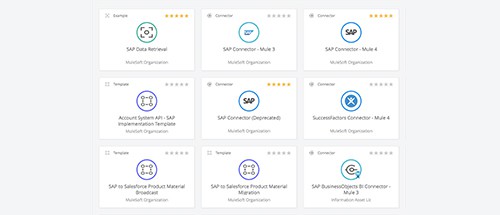
To do so, MuleSoft provides a library of over 50 SAP integration assets, including SAP-certified connectors and integration templates between SAP and common endpoints such as Salesforce and Workday. We also provide over 200 total integration assets to connect to the other systems in your technology stack.

To get in-depth knowledge, enroll for a live free demo on Mulesoft Online Training

Architecture Evolution With Mulesoft

Monolithic Architecture (Single Unit)

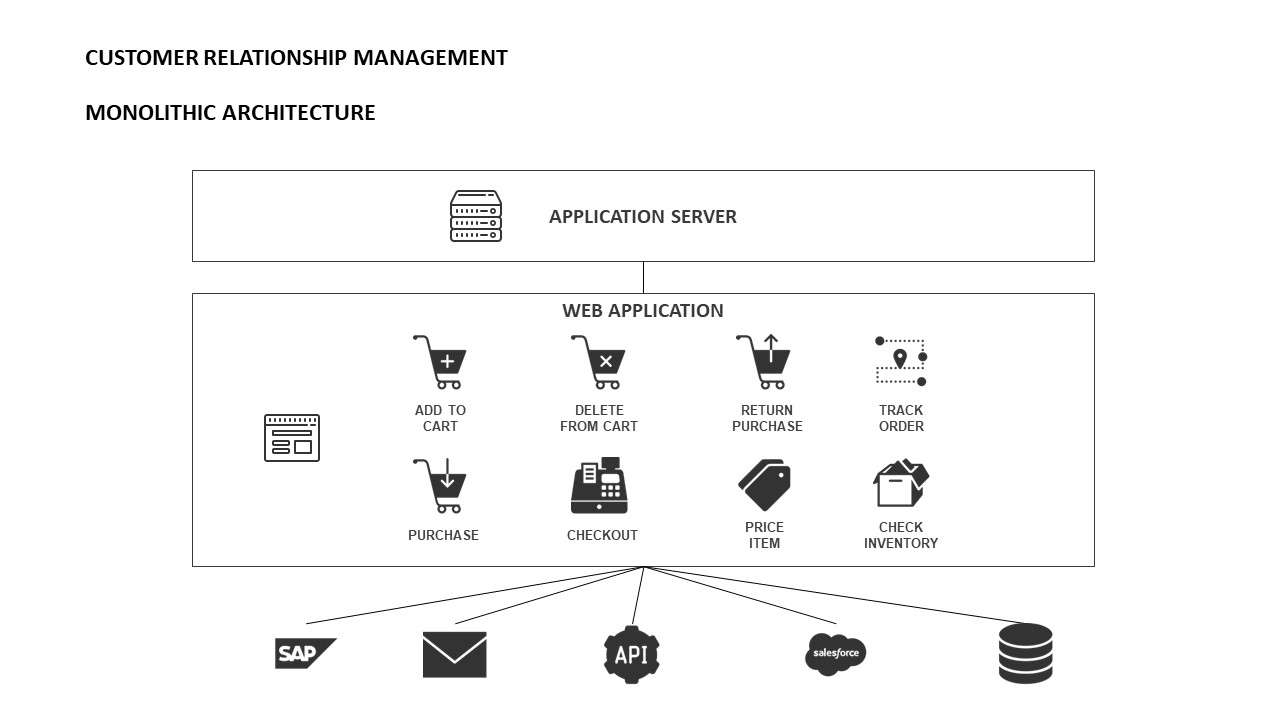
Monolithic architecture could be defined as the first architecture. Simple and tightly-coupled applications, they are executed in a single application layer and group all functionalities in the same one.

If, for example, we want to access another service or system through an API, we must develop business logic as well as error management and so on in the application itself. The following diagram shows a simple example of monolithic architecture on Customer Relationship Management.
Image title

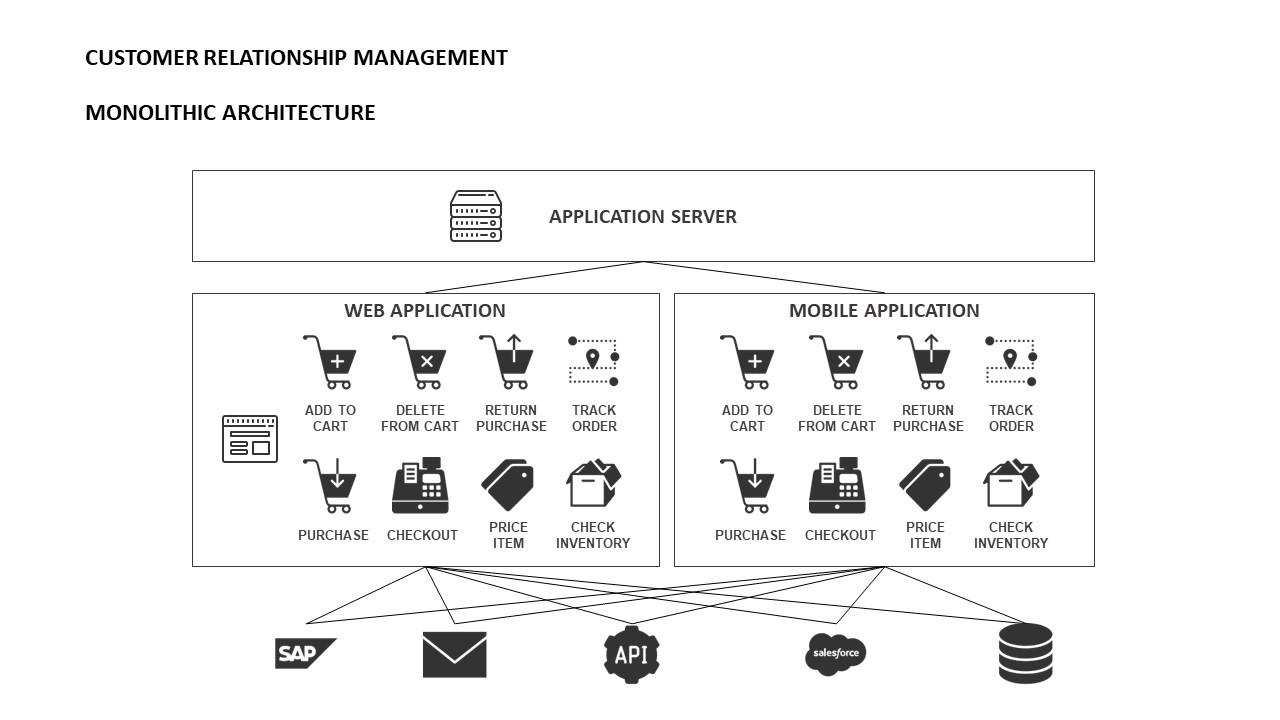
For small architectures, they work well, but when the architecture grows, the application is more complex to manage and refactor. In addition, it makes continuous integration more complicated to carry out, making the DevOps process almost impossible to accomplish. learn more from Mulesoft Training
Image title

The communication between resources and/or applications is direct without any other middleware/ESB intervening. It even increases the level of difficulty when it comes to implementing communication with a web service in some languages such as Java, where the connection with a SOAP service is complex.

SOA Architecture (Coarse-Grained)

SOA (Service-Oriented) architecture already allows for greater decoupling and therefore evolution to a more diversified architecture, or as they call it, coarse-grained.

This is the original architecture of Mulesoft, the ESB that allows to centralize all the business logic and allows the connection between services and applications regardless of their technology or language in a fast and simple way.

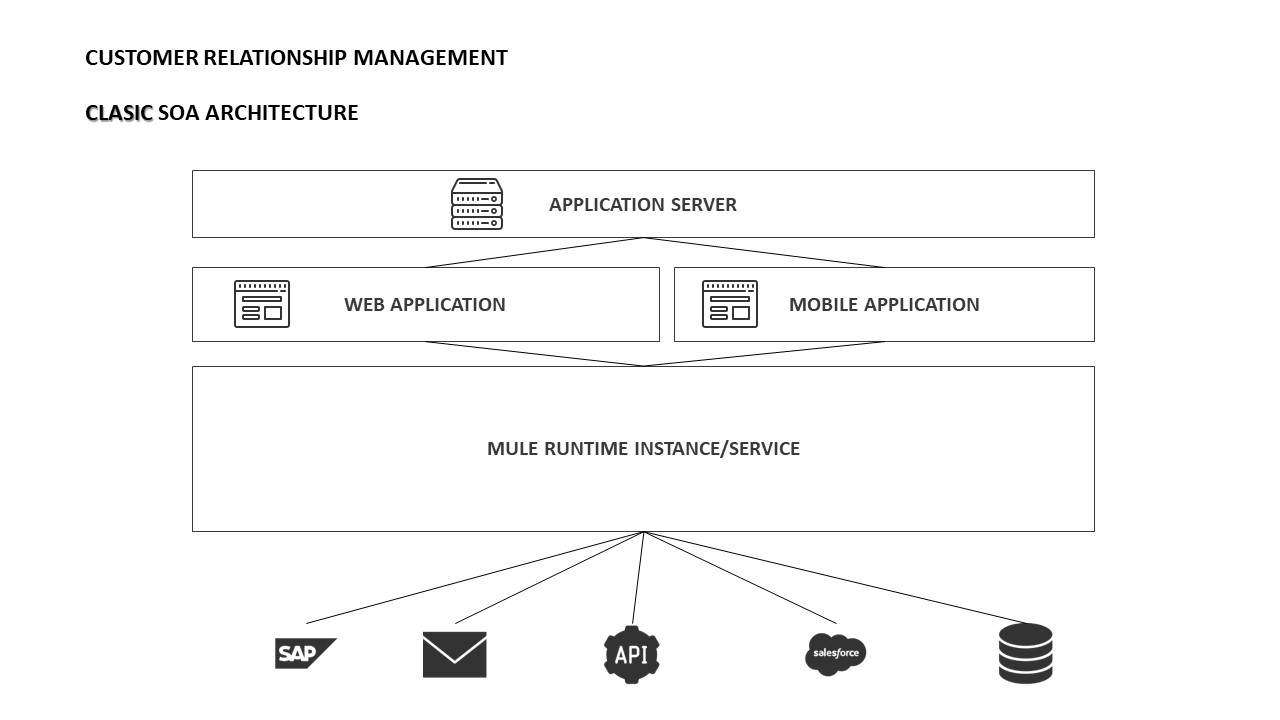
Mulesoft offers Mule Runtime, similar to Apache Tomcat, which works as a servlet container, as defined in the following diagram. Get more from Mule Training
Image title

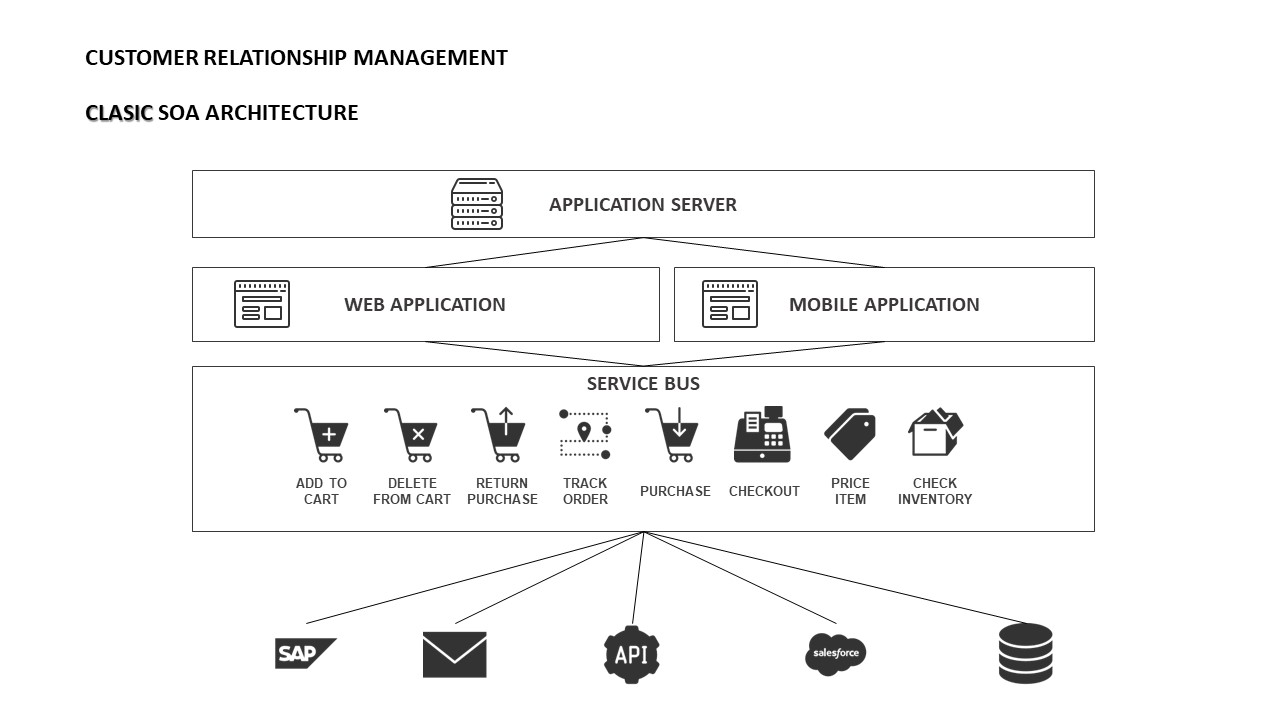
In this way, we eliminate all the work and most of the business logic to the application with monolithic architecture. The ESB will be in charge of transforming the data, routing, accessing the necessary services, managing errors, etc. The source application will simply generate a message (if necessary) and send it to the ESB via HTTP request.
Image title

However, one problem persists, and that is that all the integrations deployed work on the same runtime by leading it to the coupling and to an architecture that continues to have monolithic nature. For example, when you apply a configuration in the runtime, it will be applied to all your deployed applications.

Microservice Architecture (Fine-Grained)

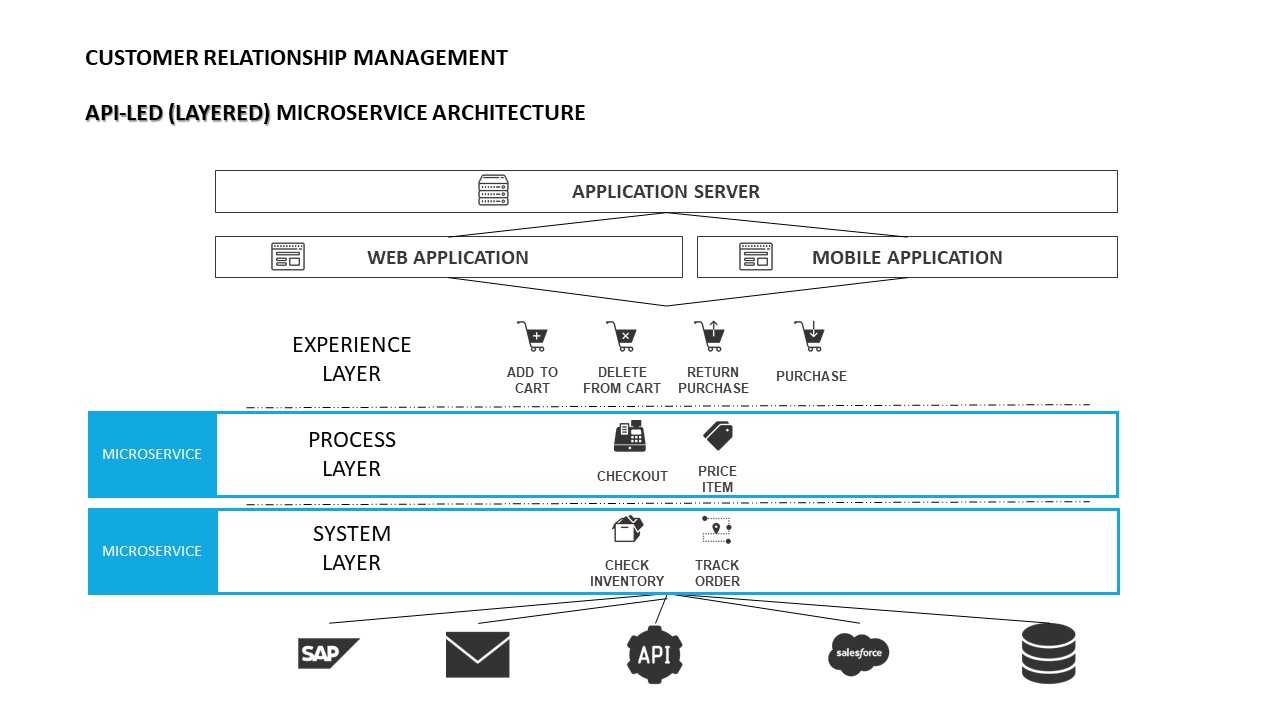
Finally, the fine-grained one. This architecture imitates SOA but with smaller and independent services. Microservices bring a lot of complexity to the architectural level as there are many small actors involved, but the advantage is that they are all isolated and independent.

The limits must be very clear, reducing it too much can end up with a very complex and excessive architecture. The use of microservices requires a great change of mentality, things must be simple, well documented, simple to execute. This is why a development cycle should also be proposed/used to execute, implement and evolve quickly.

Mulesoft has also evolved and is no longer just a middleware with SOA architecture, now also focuses on the architecture of microservices with its integration as a service (SaaS) platform, Anypoint Platform. In this way, through its Cloudhub storage platform (integrated with the Anypoint Platform), you can deploy applications so that they are automatically created in separate instances without realizing it.
Image title

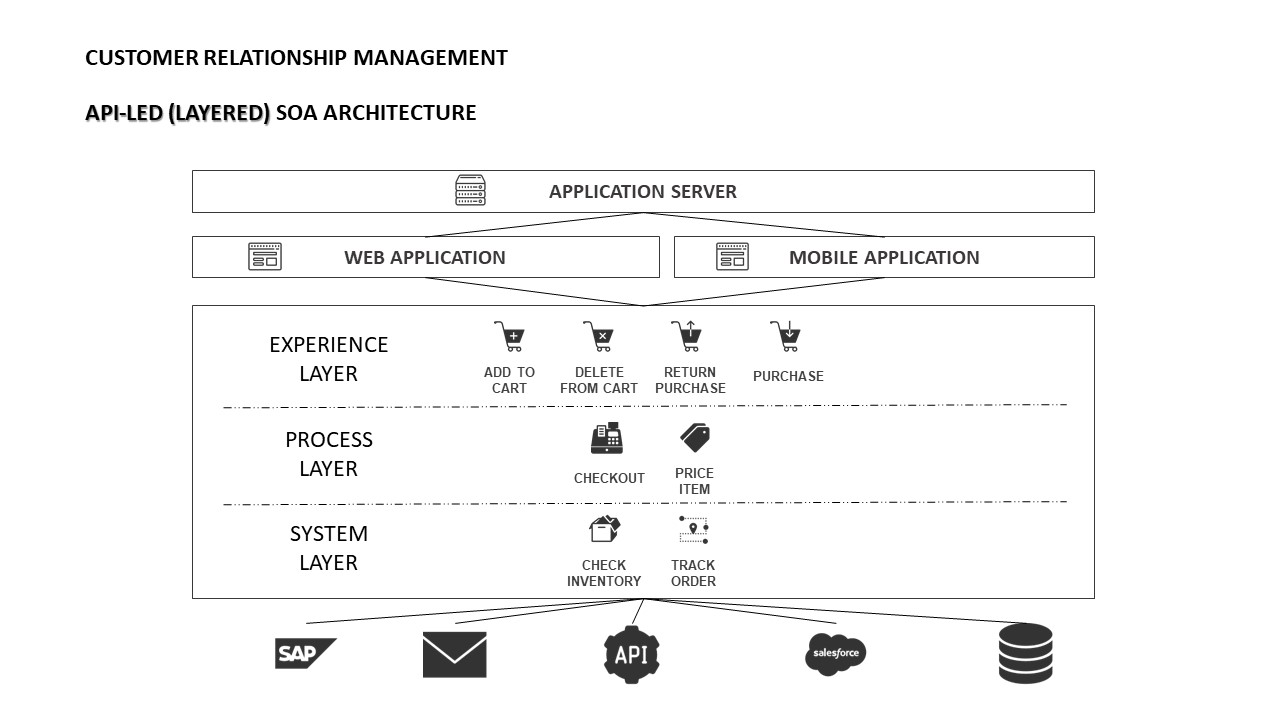
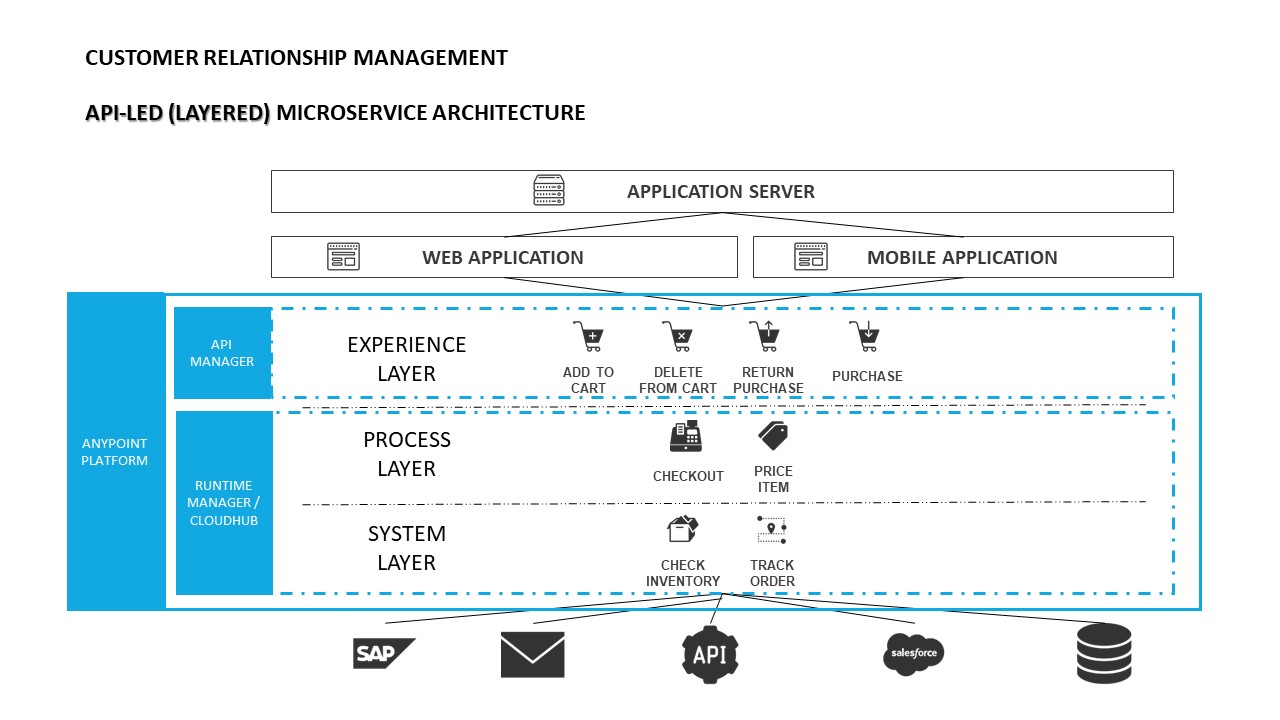
In addition, Mulesoft’s methodical way of connecting data and applications through reusable and useful APIs, API-led connectivity, which helps to decouple between the implementation and the API. API-led connectivity is divided into three layers, Experience Layer, Process Layer, and System Layer. The first layer is the one that interacts with the client and has no implementation, only an exposed API that can be managed and secured. Learn Practical skills from Mulesoft Certification
Image title

The remaining layers contain the implementation, the process layer interacts between the API exposed and the systems layer that connects to the necessary services (database, SAP, Salesforce, mail, e-commerce, etc.).

Image title

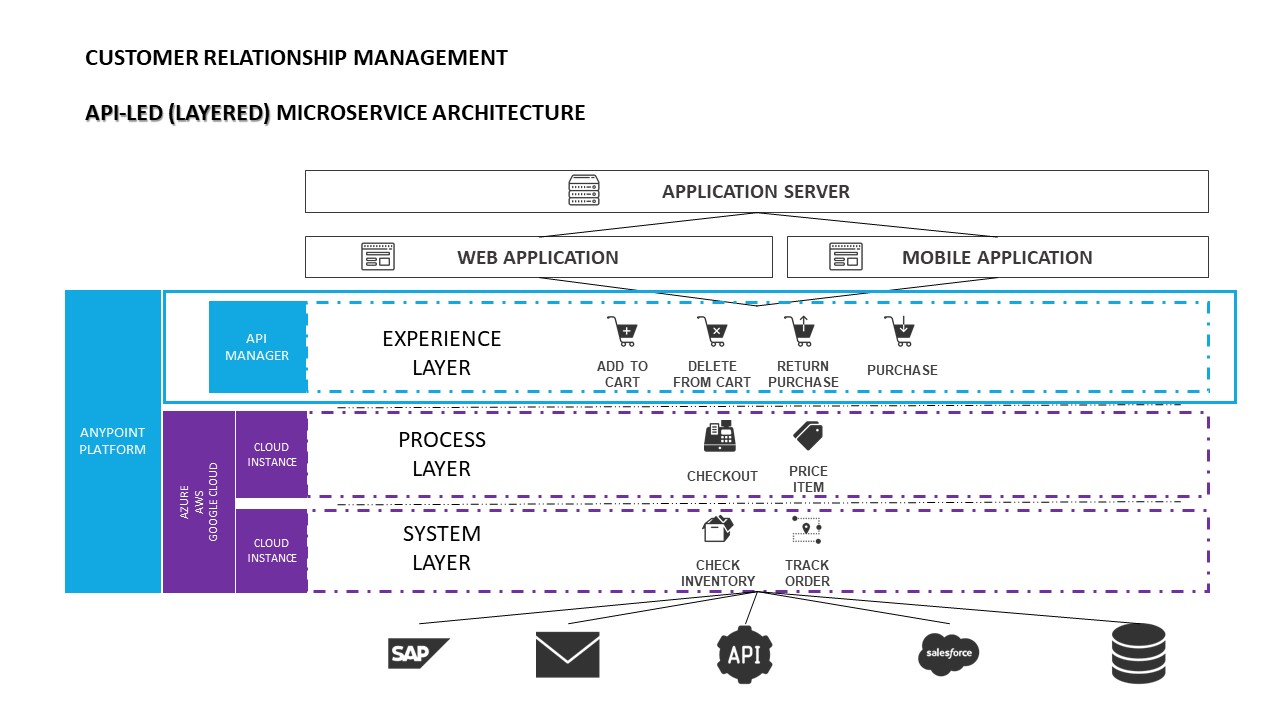
But there’s still one more evolution. Thanks to Anypoint Runtime Fabric and Runtime Manager (integrated with Anypoint Platform), these applications can be deployed on Runtimes in instances on infrastructures managed by the client in AWS, Google Cloud, Azure, virtual machines, or bare metal.

Image title

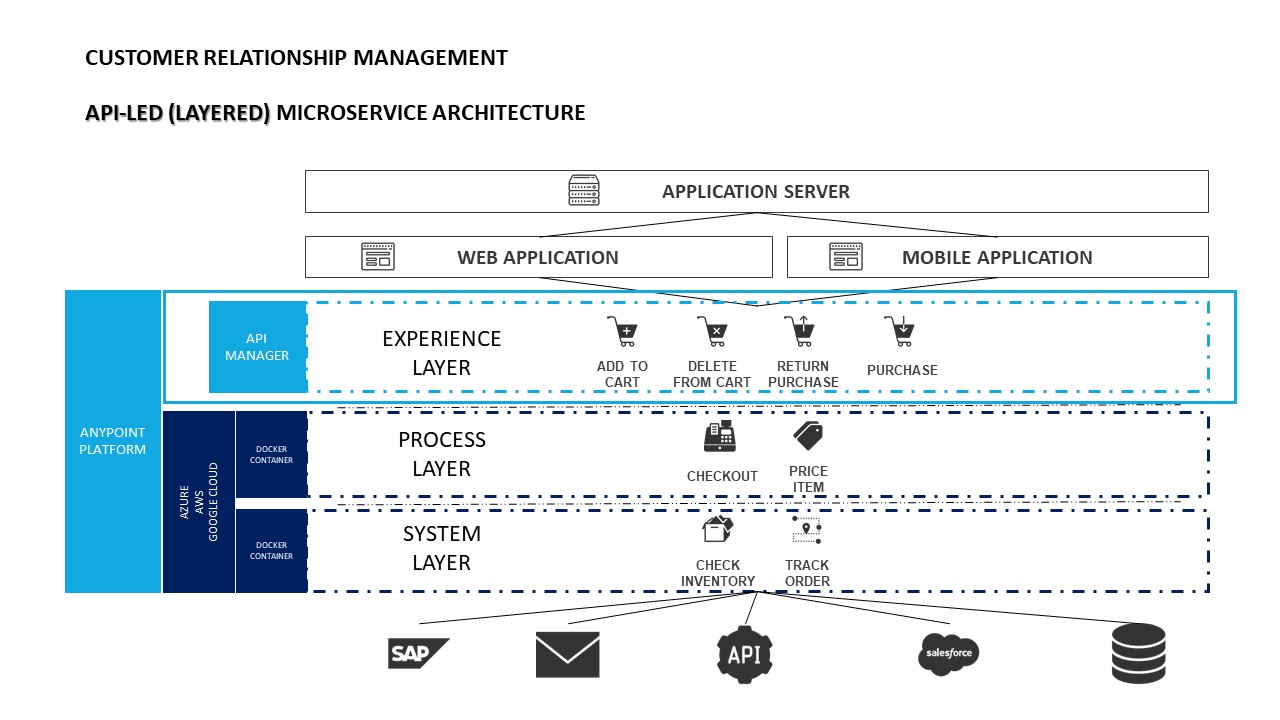
Also for containers, although it requires Docker’s knowledge.
Image title

Summary 

The problem with the supposed imperative to adopt microservices is that there are many people who feel that it is a prescriptive architecture; it must be done one certain way — like Netflix, for example — or it simply can’t be done. But adopting microservices this way is not feasible for many organizations and can lead to failure.

For organizations that have particular structures and cultures, a purist view of microservices can only go so far because of various legal, technological, and cultural constraints. Organizations will fail if they follow an overly prescriptive point of view in the microservices space if their needs are not compatible with the purist approach.

To get in-depth knowledge, enroll for a live free demo on Mulesoft Online Training

ServiceNow Makes the DevOps Connection

At present, ServiceNow DevOps is available for financial services organizations based in the Northeast region of the United States and the UK. The service gradually will be rolled out to additional ServiceNow customers over the course of 2020. ServiceNow DevOps initially integrates with Jira Software, GitHub, BitBucket and Jenkins, with more integrations expected to be rolled out periodically.

Hawes said ServiceNow recognizes that IT organizations are building and deploying applications at rates that are faster than existing ITIL-based approaches can track. However, ITIL-based frameworks provide the highly structured set of processes around which the bulk of IT environments are managed. For more info Servicenow Training

ServiceNow DevOps enables IT teams to automate change management tasks such as planning, development, testing, deployment and operations via a single dashboard surfacing a common set of metrics, he said. He added in many cases, those preset rules and policies will eliminate manual processes that often conspire to slow the rate at which applications can be deployed and updated within any IT environment, said Hawes.

No developers need to be involved in those processes because IT operations teams can set rules and policies, and developers will see their code running in production environments in a matter of minutes regardless of what tools they employ, said Hawes. That approach also will make it easier to scale DevOps across an enterprise IT organization at a time when adoption of DevOps is still uneven at best, he noted.

At the same time, that level of integration should also make it easier for IT teams to audit DevOps processes using a common framework to capture events such as when code is checked into a DevOps platform, he said.

That capability is a critical requirement for any company trying to apply best DevOps processes with the context of a highly regulated industry such as financial services.

Hawes said the majority of organizations that have adopted ServiceNow to manage IT have also adopted a DevOps platform.

Overall, Forrester Research reports 56% of global infrastructure decision-makers now report that their organizations are implementing, have implemented or are actively expanding their DevOps initiatives.

ServiceNow doesn’t expect DevOps processes to supplant ITIL-based frameworks as much as it anticipates both approaches co-existing as they continue to evolve, he said.

With the release of the latest version of the ITIL framework, it’s apparent that the proponents of ITIL have come to recognize that IT needs to become more agile to meet the needs of digital business. The challenge they face is finding ways to enable IT teams to become more agile without sacrificing the gains in stability achieved over the course of the last two decades. With the launch of ServiceNow DevOps, the effort to find a middle ground between those two extremes can now begin in earnest.

To get in-depth knowledge, enroll for live free demo on Servicenow Online Training

What is Workday Financial Management? What are the Key features and benefits of Workday Financial Management?

In Today’s market businesses are increasing globally and changing rapidly. A lot of Finance organizations are facing a lot of pressure to go beyond in managing to account. They have to manage accounting, cash, assets, and projects, and complete processes such as consolidate to close, contract to cash, procure to pay, projects, and planning.

This is to support global growth, achieve profitability, and provide strategic direction, as well as meet the complex and stiff demands for compliance and regulatory oversight. These core functions across multiple and disparate systems are addressed by the traditional solutions which are making challenges to deliver insights to frontline managers and impossible to assess performance in real-time and also to plan for the future. For more info Workday Online Training

By using in-memory and an object data model, Workday has delivered a single system that supports transaction processing, multidimensional reporting, consolidation, planning, and compliance — all using a consistent user experience accessible from a desktop or mobile device.

All the financial management capabilities which are expected from a cloud solution are provided by the Workday Financial Management as it is built on an adaptive, global foundation. It goes well beyond just managing financial processes to achieve greater insight, to improve financial consolidation, instill internal control, to achieve consistency across global operations, and also to reduce time to close.

Applications and Features:

• Accounting and Finance

• Revenue Management

• Financial Reporting and Consolidation

• Financial Planning

• Projects

• Expenses

• Procurement

• Inventory

• Grants Management

• Project Billing

• Audit and Internal Controls

Key Benefits:

• Provide executives and business managers with relevant, contextual financial insights that are available on the device of their choice

• Provide best-in-class and pervasive “always-on” audit capabilities

• Without business disruption, Embrace the organizational, process, and reporting changes.

• Provide a consistent and easy-to-use interface for all users like employees, managers, executives, and auditors Learn more skills from Workday Training

Access a New Level of Insight:

Provide your managers and executives with the information they need to make the best business decisions. Workday allows capturing the details of every financial transaction which includes the who, what, where, and why — to better serve and inform all teams — not just finance.

Designed for Change:

Without additional cost even after deployment, the innovative Workday technology enables you to respond to organizational, business process, and reporting changes as they occur.

Created for Finance and Business Users:

The instinctive user interface in Workday enables business customers and finance professionals to navigate the application with minimal training. Executives and line management also benefit from the Workday experience, with easy access to information that impacts their day-to-day business decisions. For more info Workday Financials Training

Planning:

To streamline the planning process and accelerate time to action, Financial planning in Workday takes advantage of real-time financial data. It enables organizations to execute and create enterprise financial plans. Cross-functional teams can create, collaborate, and take action on budgets and forecasts all within Workday. As business objectives and market dynamics change, budgets and forecasts can be adjusted easily and shared with key stakeholders across an organization.

Automate and Control Your Cash Flow:

A system that shows you real-time cash balances and transactions help you manage resources effectively and make good decisions about funding, paying, and collecting money. The Workday settlement engine gives you oversight into all transactions like spending, revenue, finance, and payroll. By understanding inflow and outflow, you can also forecast cash flow into the future more accurately.

Workday records all the rich operational information surrounding transactions while maintaining the accounting information expected of a global general ledger. Provides insights beyond traditional accounting dimensions, and meet global regulatory and financial reporting requirements.

Global capabilities, including multi-currency, multi-language, multibook, and more, are built into the core system to support multinational requirements today and into the future.

Significantly streamline your chart of accounts for a faster, more accurate financial close. The workday can model multiple operating entities, companies, or business units to easily complete intercompany transactions, eliminations, allocations, adjustments, and consolidated reporting.

The Workday Financial Management Certification Training Program in IQ online will provide you with in-depth knowledge of Accounting and Finance, Revenue Management, Financial Reporting, and Consolidation, Financial Planning, Project Billing and many more. Training at IQ Online will help you to become a certified Workday Financial Management professional with Real-time projects and use cases. You will get the best support and guidance from our team of experts.

To get in-depth knowledge, enroll for a live free demo on Workday Integration Training

Design a site like this with WordPress.com
Get started