Project Import and Export Microsoft Project with Servicenow Orlando

You can manage projects using both Microsoft Project and the ServiceNow Project Management application.

Users with it_project_manager role can export projects and project tasks to Microsoft Project where they can be managed separately and then imported back into the instance as needed. You can import projects created in Microsoft Project 2003, 2007, 2010, 2013, or 2016 into the Project Management application.

If you import a Microsoft project into the instance as a new project, a new record is created in the Project [pm_project] table, and tasks associated with the project are added to the Project Task [pm_project_task] table.

Only the fields that are common or mapped between the applications are imported. Imported projects are brought into the instance with both Priority and Risk set to Low.

If you import a Microsoft project into an existing project, the instance checks the Text10 field in the top-level Microsoft Project task.

If the Text10 field contains a recognizable sys_id, the project was previously exported from the instance. In this case, the values from the project overwrite the values for the project. Learn more skills from Servicenow Training

When you import a project into the instance, project constraints that are not supported are converted as follows:

  • Time constraints: The Project Management application sets the time constraint for all imported tasks to Start on specific date irrespective of their time constraint in Microsoft Project.

Note: The resource name in Microsoft Project should map to the name of the user in the instance.

The following calendar elements from Microsoft Project are not imported into pProject Management:

  • Project calendars
  • User calendars
  • Schedules

The imported project uses the default schedule of a Monday to Friday workday from 8 A.M. to 5 P.M. with an hour break for lunch.

Support versions

  • Microsoft Project 2003
  • Microsoft Project 2007
  • Microsoft Project 2010
  • Microsoft Project 2013
  • Microsoft Project 2016

Project export to Microsoft Project:

If you are using Microsoft Project to manage project activities, you can export a project to XML format and import it into Microsoft Project.

Users with the project manager role can export a project using:

  • The Export Project module
  • The Project form

Project managers can also export project tasks using the Project Task form.

Create custom field mapping for Microsoft Project file import

Map custom fields from Microsoft Project to ServiceNow fields before importing a project.

Before you begin

Create custom fields in your ServiceNowinstance before mapping them with Microsoft Project.

About this task

Map the custom fields that you create in your ServiceNow instance with custom fields in the Microsoft Project file you plan to import.

The supported data types for field mapping between Microsoft Project and ServiceNow instances are:

  • True/False
  • Calendar
  • Date/Time
  • Choice
  • Color
  • Currency
  • Decimal
  • Due Date
  • Floating Point Number
  • Date
  • Date/Time
  • Duration
  • List
  • Time
  • HTML
  • Integer
  • Long
  • Percent Complete
  • Phone Number (E164)
  • Reference
  • Name -Value Pairs
  • String
  • Translated HTML
  • Translated Text
  • URL

Procedure

  1. Navigate to Project Administration > Project – MSP Import Field Mappings.
  2. Click New.
  3. From the Table list, select the table in which you created the custom field.
  1. In the Microsoft Project Column field, enter the name of the custom field in your Microsoft Project file that you want to map.
  2. In the Destination Column list, select the custom ServiceNow field that you want to map to the Microsoft Project field while importing a project.
  3. Click Submit. For more info Servicenow Developer Training

What to do next

  • Import the Microsoft Project file. For more information
  • Configure the Project form to add the custom fields that you want to see.

Import a Microsoft Project file:

You can import Microsoft project files into the Project Management application.

Before you begin

Role required: it_project_manager

About this task

Before importing a Microsoft Project file into the ServiceNow instance, consider the following information.

  • Microsoft Project project imported into a teamspace is only available to users who can access the teamspace.
  • To import custom fields in your Microsoft project, create those custom fields in your ServiceNow instance first, and then create mapping between these fields before importing the project.
  • You can also use the Scripted Extension Points for importing custom fields without creating and mapping the custom fields manually. Use the MSProjectImportTaskFormatter Extension Point to create a script include and map custom fields in Microsoft Project and ServiceNow. You can also use this Extension Point to modify the data while importing a project.
  • Recalculation does not happen on project tasks when they are imported from the Microsoft Project file. Once the project is in the ServiceNow system, it would be treated as a manual project.
  • Importing a Microsoft Project project with inter-project dependencies, does not import the shadow tasks.
  • Only the subprojects get imported into the ServiceNow instance, the subproject tasks are not imported.
  • While importing a Microsoft Project file into ServiceNow, the import fails:
    • If the project with tasks was created in ServiceNow instance before the import.
    • If you create tasks in a project in ServiceNow instance which was imported from Microsoft Project file earlier, and then reimport.

Note: To retain the project tasks that were created in the ServiceNow instance, you must export that project first into the Microsoft Project file. Then, reimport the file back into instance instance.

  • If the task being deleted due to import has any of the related entities: Cost plan, Benefit plan, Resource plan, Time card, or Expense lines.
    • If the values for lag or lead time dependencies are not in the supported format.
      • Positive lag time dependency values for days, hours, and minutes are allowed. Negative lag time dependencies are allowed only for days.
      • All other elapsed duration types from Microsoft Project such as emin, eday, eweek, emon, eyr, or % are not allowed for import.

Procedure

  1. Navigate to Project > Projects > Import.
  2. Click Choose File to select a Microsoft Project file.
  3. To import the Microsoft project as a new project, select the Create new project option.
  4. To import the Microsoft project as a subset of an active, existing project or task:
    1. Select Update and existing project.
    1. Click the reference lookup icon (Lookup icon) and select a project or task. Only active projects appear in the list.
  5. Click Import. For more info Servicenow Certification

Result

  • A project task that was imported in ServiceNow instance earlier and has associated time cards, resource plans, cost plan, benefit plan, or expense lines is retained on reimport even if it is deleted from Microsoft Project.
  • Dates in the ServiceNow project remain same as the dates in the Microsoft Project file.
  • In a ServiceNow project with subprojects, the following details change:
    • The WBS order of imported tasks is regenerated after import.
    • The Planned Start Date and Planned End Date of the parent project are rolled up.
    • The State of the parent project and tasks are rolled up.
    • The % Complete on the top task is rolled up.

Export project tasks

The task being exported must be associated with a project that uses either the Project Management Schedule or the Default MS Project schedule.

Before you begin

Role required: it_project_manager

Procedure

  1. Navigate to Project > Projects > All.
  2. Open the project.
  3. Scroll to the Project Tasks related list and click a task number to open the Project Task form.
  4. Right-click the form header and select Export Task to MS Project from the context menu.

The task is exported to a folder on your system.

  • Open Microsoft Project to import the exported project task files. Refer to Microsoft product documentation for instructions.

Calendars and schedules: Limitations

Some calendar elements from Microsoft Project are not imported into the Project Management application.

  • Project calendars
  • User calendars
  • Schedules

The imported project uses the default schedule of a Monday to Friday workday from 8 A.M. to 5 P.M. with an hour break for lunch, starting with the v3 application.

Using the export project module

The Export Project Module exports a project to XML format.

Before you begin

Role required: it_project_manager

About this task

ServiceNow projects must use either the Project Management Schedule or the Default MS Project schedule before they can be exported.

Procedure

  1. Navigate to Project > Administration > Export Project.
  2. Select a project in the Project to export field.
  3. Click Export to export the project to a folder on your system.
  4. Open Microsoft Project to import the exported project files. Refer to Microsoft product documentation for instructions.

To get in-depth knowledge, enroll for a live free demo on Servicenow Online Training

MicroStrategy for Tableau Connector with step-by-step

MicroStrategy for Tableau allows you to fetch data from reports or cubes that reside in MicroStrategy projects into Tableau Public (also known as Tableau Desktop). You can import datasets with up to four million rows and 30+ columns.

Using the Tableau connector in MicroStrategy 2019 Update 2 requires the Use Application Tableau privilege. This privilege is located in the Client-Application-Tableau privilege group.

To use the connector, Tableau Public 10.4 or later is needed.

To use the connector, you must have the CommunityConnector.war file deployed in your environment.

To deploy your .war file, perform the following steps:

  1. Install the MicroStrategy Community Data Connectors component during installation. The component will be installed in C:\Program Files (x86)\MicroStrategy\CommunityConnectors.
  2. Open the CommunityConnectors folder and copy the CommunityConnectors.war file.
  3. Open the Tomcat installation folder. In the webapps folder, paste the .war file. For example, you would paste the .war file in the following location: Program Files (x86)\Common Files\MicroStrategy\Tomcat\apache-tomcat-9.0.22\webapps.
  4. Restart the Web Server to deploy the connector. For more Tableau Training

Confirm your .war file is deployed by opening the following link: http://yourservername:8080/CommunityConnectors/. If the Community Connectors set up page appears, you have deployed your file.

To Import Data from MicroStrategy to Tableau

  1. Open Tableau Desktop Public Edition. Under Connect, click Web Data Connector.

If it is not there, click More > Web Data Connector.

  1. Enter the following URL: https://<MSTR Domain>/CommunityConnectors/mstr/

If the connector does not automatically detect Tableau, add the query ?mode=tableau to the end of the URL and refresh your browser.

  1. Enter your API Server URL and environment credentials.

Your REST API URL is your environment URL with /MicroStrategyLibrary/ added at the end.

  1. Click Log in with credentials.
  2. Select your applications.
  3. Click OK.
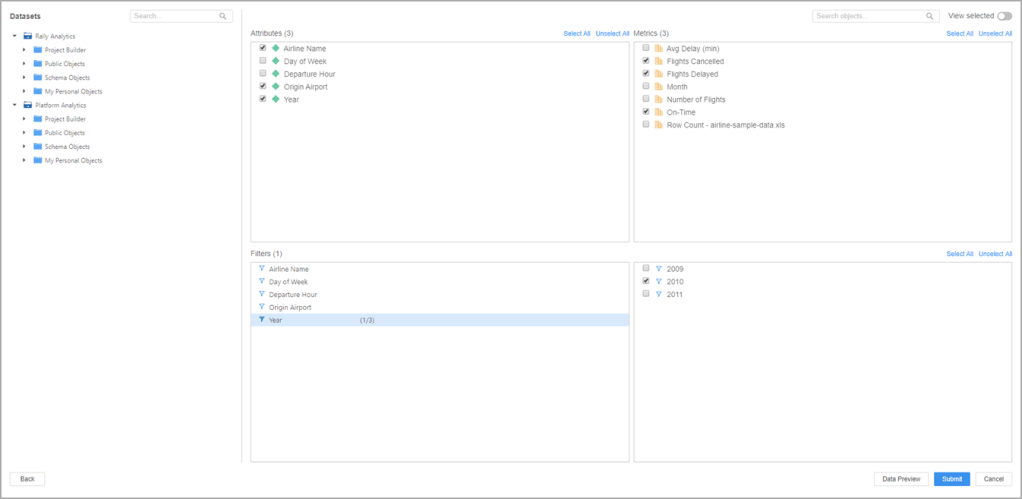
  4. Under Datasets, select a dataset or use the search to locate a dataset.
  5. Select the attributes, metrics, or filters to include.
  1. Click Select All to either select all attributes, metrics, or filters.
  2. Use the View selected toggle to only see selected objects.
  3. Click Data Preview.
  4. Click Submit.
  5. Click Update Now or Automatically Update to finish importing your dataset into Tableau.

To get in-depth knowledge, enroll for a live free demo on Tableau Online Training

Asset Management Process and Module

Asset management integrates the physical, technological, contractual, and financial aspects of information technology assets.

Asset management business practices have a common set of goals.

  • Control inventory that is purchased and used.
  • Reduce the cost of purchasing and managing assets.
  • Select the proper tools for managing assets.
  • Manage the asset life cycle from planning to disposal.
  • Achieve compliance with relevant standards and regulations.
  • Improve IT service to end users.
  • Create standards and processes for managing assets.

Most successful ITAM programs involve a variety of people and departments, including IT, finance, services, and end users.

Asset Management and configuration management (CMDB) are related, but have different goals. Asset management focuses on the financial tracking of company property. Configuration management focuses on building and maintaining elements that create an available network of services.

Asset Management Overview module:

The Asset Management Overview module displays various asset management gauges showing information such as configuration item by manufacturer, computers by manufacturer, configuration item types, and asset information for a specific vendor. It also includes a gauge showing pending asset retirements for the current week, month, and year.The Overview module is a type of homepage.

Roles

Only users with certain roles have access to the Overview module. These roles can view the overview page and refresh, add, delete, and rearrange gauges.

  • admin
  • asset
  • sam

Asset Management process

The best method for managing assets depends on business needs and how your business is organized.

About this task

These steps are one possible process for getting started with Asset Management.

Procedure

  1. Identify assets in your system. A key component of asset management is the initial and ongoing inventory or discovery of what you own. The ServiceNow platform provides the following options for asset discovery.
  2. The separate, robust Discovery tool.
  3. A lightweight, native discovery tool, Help the Help Desk lets you scan your network proactively to discover all Windows-based PCs and the software packages installed on those PCs. This WMI-based discovery is included in the base self-service application.
  4. For organizations that want to use the discovery technologies they have deployed already, such as SMS, Tally NetCensus, LanDesk, or others, ServiceNow can support integration to those technologies via web services. Scanned data can be mapped directly into the configuration management database (CMDB).
  5. Clean up information in the configuration management database (CMDB). Remove information that is obsolete or invalid. Ensure that all remaining information is accurate and complete. Add any necessary information.
  6. Create categories of asset models such as computers, servers, printers, and software. For more info Servicenow Training
  7. Create asset models. Models are specific versions or various configurations of an asset, such as a MacBook Pro 17″.
  8. Create individual assets, such as hardware, consumables, and software licenses. If you used a discovery tool, you may already have many assets identified accurately.
  9. Manage assets by counting software licenses, viewing assets that are in stock, setting asset states and substates, and analyzing unallocated software.

Asset classes:

The default asset classes are Hardware, Software License, and Consumable. These general classes can be used to manage a variety of assets.

If the general classes are not appropriate for a specific group of assets, consider creating a new asset class. For example, a fleet of cars could be tracked in a custom asset class named Vehicle. Before creating new asset classes, analyze business needs to see if the general classes can be used. A large number of asset classes can be difficult to maintain.

Built-in functionality allows you to use asset classes for financial tracking, in a model bundle, and as a pre-allocated asset.

Create an asset class:

Creating a new asset class requires defining a new table and creating a corresponding application and module, then adding the new asset class to new or existing model categories.

Create an asset class:

Creating a new asset class requires defining a new table and creating a corresponding application and module, then adding the new asset class to new or existing model categories.

Before you begin

Role required: asset or category_manager

About this task

Ensure that the model categories contain models. Use the Table Creator to extend an existing table. Get more additional details from Servicenow Certification

Procedure

  1. Navigate to System Definition > Tables & Columns and scroll to the bottom of the page.
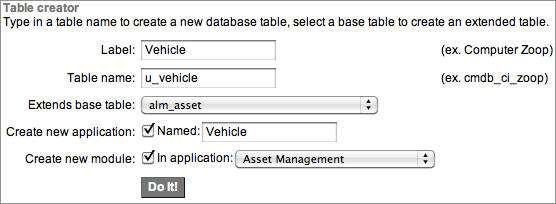
  2. Fill in the Table Creator fields with information about the new table.

For example, to extend the alm_asset table with a new table named u_vehicle and add a new application named Vehicle, fill out the Table Creator fields with the following information.

FieldValue
LabelEnter Vehicle.
Table nameCheck that u_vehicle has been added to the field automatically.
Extends base tableSelect alm_asset.
Create new applicationCheck that the Named check box is selected and that Vehicle has been added to the text box automatically.
Create new moduleCheck that the In application check box is selected and select Asset Management.
  1. Click Do It!.
  2. Navigate to the new application (for example, Asset Management > Vehicle) and click New.
  3. Configure the form to include ModelModel Category, and Quantity.
  4. Create a model category and add the asset class you created to the Asset class field.
  5. Create new models and add them to the model category.

Asset and CI management

  •  
  •  
  •  

Asset and Configuration Item (CI) management refers to creating assets, setting states and substates for assets and CIs, mapping assets and CIs so that they are in synch, managing consumables, and retiring assets.

Relationship between asset and CI

It is important to manage the relationship between assets and associated CIs. Assets are tracked with the Asset Management application, which focuses on the financial aspects of owning property. Configuration items are stored in the CMDB, which is used to track items and make them available to users.

When an asset has a corresponding configuration item, the asset record and the configuration item record are kept synchronized with two business rules.

  • Update CI fields on change (on the Asset [alm_asset] table)
  • Update Asset fields on change (on the Configuration Item [cmdb_ci] table)

Note: Assets and CIs can be synchronized only if they are logically mapped.

Asset-CI mapping and synchronization

The State field of asset record and Status field of CI record are synchronized so that changes made on one form trigger the same update on the corresponding form, ensuring consistent reporting.

Note: The ServiceNow platform synchronizes updates between assets and configuration items only if the asset and configuration item are pointed toward each other.

The following diagram illustrates the concept of Asset-CI mapping and synchronization.Asset-CI mapping and synchronization:

To get in-depth knowledge, enroll for a live free demo on Servicenow Online Training
10 Must-Read Books for Software Engineers

Finding great books for software engineering is not an easy task because the ecosystem changes so rapidly, making many things obsolete after a short time. This is especially true regarding books that rely on a specific version of a programming language.

Cracking the Coding Interview

“Cracking the Code Interview: 189 Programming Questions & Solutions” is highly recommendable to anyone who wants or needs to take coding interviews.

Author Gayle Laakmann McDowell, an experienced software engineer, was both an interviewer and a candidate. She can help you to look for hidden details in questions, to break problems into small chunks, and to get better in learning concepts.

Furthermore, Gayle provides you with 189 real interview questions and solutions so you can prepare well for the next coding interview!

Code Complete

“Code Complete: a Practical Handbook of Software Construction, 2nd Edition” by Steve McConnell is one of the books every programmer should probably have skimmed through once in their life.

It’s a comprehensive analysis of software construction, well written, and highly accepted in the industry. It deals with topics such as design, coding, debugging, and testing.

Overall, this book will probably have the highest ROI for developers with one to three years of professional programming experience. But I recommend it to beginners as well because it helps give you more confidence when constructing software.

The main takeaway? Developers have to manage complexity. To write code that is easy to maintain and to read for you and for others.

Clean Code

“Clean Code: A Handbook of Agile Software Craftsmanship” by Robert C. Martin (Uncle Bob) is one of the most popular programming books around. It was written to teach software engineers the principles of writing clean programming code.

It comes with a lot of examples showing you how to refactor code to be more readable and maintainable, but be aware of the fact that it is very Java-centric.

While some of the patterns and techniques are transferable to general programming or other languages, the book’s primary audience is Java developers.

Another thing to note is that the book is from 2009. Some content, like code formatting, is less relevant today because of the tools and IDEs that are available. But it is a good read after all. For more info Java Training

Refactoring

The book Refactoring: Improving the Design of Existing Code, 2nd Edition by Martin Fowler explains what refactoring really is, just like the original 20 years ago. Questions that you may ask yourself and that are answered in this book are:

  • Why should I refactor my code?
  • How can I recognize code that needs refactoring?
  • How can I successfully refactor my code?

After reading this book, you should understand the process and general principles of refactoring that you can quickly apply to your codebase. You should also be able to spot “bad smells” in your teammate’s code that need refactoring.

Head First Design Patterns

“Head First Design Patterns: A Brain-Friendly Guide” by Eric Freeman, Bert Bates, Kathy Sierra, and Elisabeth Robson teaches you design patterns and best practices used by other developers to create functional, reusable, elegant and flexible software.

It is also filled with great visualizations that will help you to learn new concepts more easily.

If you want to learn about things like factories, singletons, dependency injections, etc., this book is a great choice.

The examples are written in Java, so it wouldn’t hurt to know that language or another object-oriented one.

Patterns of Enterprise Application Architecture

“Patterns of Enterprise Application Architecture” is another great book by Martin Fowler that deals with the practice of enterprise application development.

After a short tutorial on how to develop enterprise applications, Martin then gives you over 40 patterns as solutions to common problems while architecting enterprise applications.

It also comes with a lot of UML visualizations and code examples written in Java or C#.

After reading the book, you should be able to divide an enterprise application into layers, to know the major approaches of organizing business logic, to use the MVC patterns to organize web applications, and to handle concurrency for data over multiple transactions. Learn more info Core Java Online Training

However, the book is aging pretty badly, so modern concepts like REST, cloud, or JSON are not mentioned. It’s still a good read, but be critical while doing so!

Working Effectively with Legacy Code

In “Working Effectively With Legacy Code” by Michael Feathers, the authors offer strategies to deal with large, untested legacy code bases.

While you might think that we are in 2020 now and legacy code shouldn’t be a problem anymore because we only have clean, maintainable code and microservices all along, let me assure you that this is a misconception. Legacy code still is one of the most challenging problems for many companies.

After reading this book, you should be able to understand the general mechanics of software change, like adding features, fixing bugs, optimizing performance, and improving the design.

Furthermore, you learn how to get legacy code ready for testing and how to identify where the code needs changes.

The book provides examples written in Java, C++, C, and C# but also comes with tips on how to deal with legacy code that is not object-oriented.

The Clean Coder

Another book by Uncle Bob teaches techniques, disciplines, tools, and practices of true software craftsmanship.

“The Clean Coder: A Code of Conduct for Professional Programmers” is packed with practical advice about estimating, coding, refactoring, and testing.

After reading this book, you should be able to deal with conflicts, tight schedules, and unreasonable managers; to handle unrelenting pressure and avoid burnout; to manage your time; to get into the flow of coding; and to foster environments where developers and teams can thrive.

This book is pretty accepted in the industry, but I think not everything in it is pure gold. It contains many anecdotes and hypothetical conversations that most of the time come to the conclusion that the developer is ultimately responsible for what they do.

This goes so far that in one statement, the advice for a developer whose code produced a bug is to reimburse the company financially for the money loss.

So my advice is to read the book carefully and critically if you do!

Introduction to Algorithms

“Introduction to Algorithms, Third Edition” by Thomas H. Cormen, Charles E. Leiserson, Ronald L. Rivest, and Clifford Stein is nothing less than an essential guide to algorithms of all kinds.

It is very comprehensive and accessible to all kinds of readers, beginners, and professionals alike. It is clearly worded and covers a lot of subject matter. But it also is kind of complex and not so easy to follow.

It covers topics such as data structures, fast algorithms, polynomial-time algorithms for seemingly intractable problems, graph theory, computational geometry, and much more.

While it contains some examples in pseudo-code, it still is a very theoretical book in my eyes.

The Pragmatic Programmer

“The Pragmatic Programmer” is one of the most significant books I have ever read.

It is filled with both technical and professional practical advice that helped me in a lot of projects and to become a better developer.

The book is highly relevant even in 2020, especially with the new 20th Anniversary Edition.

It examines what it means to be a modern developer by exploring topics that range from personal responsibility and career development to architectural techniques.

After reading the book, you should know what continuous learning means and how important it is; how to write flexible, adaptable and dynamic code; how to solve the problems of concurrent code; how to guard against security vulnerabilities; how to test ruthlessly and effectively; and much more.

If there was one book I had to pick to recommend to you, it would definitely be this one!

To get in-depth knowledge, enroll for a live free demo on Java Online Training

Mule containerization

Containers are becoming the de-facto hosting platform from microservices to databases and everything in-between.

Kubernetes has emerged as the primary container orchestration platform, and MuleSoft offers Anypoint RTF, a Kubernetes-based container orchestration platform to run APIs and applications at scale, providing elasticity. 

But there are many customers who use other container orchestration platforms standardized for their organization  that they would prefer to run Mule on.

This blog will walk you through a tried and tested architecture for accomplishing this.

The ephemeral nature of containers presents challenges to managing Mule runtimes, applications, and APIs deployed in them.

Every time a container is shutdown (planned or unplanned) the container gets terminated for good, thus ending the lifecycle of the Mule. This is in sharp contrast with classic Mule running on vm’s, where shutdown is a momentary pause. 

Containers present following challenges:

  • Mule runtime engine registration with Anypoint management plane .
  • Mule runtime engine deregistration.
  • Log retention and aggregation.
  • Policy enforcement on APIs.

Although there are several ways of containerizing Mule, the diagram above indicates a tried and tested approach for containerizing Mule, as it provides the best of both worlds. It ensures compliance with Twelve-Factor app for containers, and leverages all the API management benefits Anypoint Platform offers.  For more info Mulesoft Training

How it works

  • User checks-in the code to source control system.
  • Jenkins (or any other CI) detects the change and builds the Mule deployable.
  • The subsequent CI step also packages the Mule app, Mule runtime, registration script, JDK, and OS into a Docker image
  • Jenkins deploys the fully packaged image onto Kubernetes/DockerSwarm.  
  • The Docker image gets booted and it executes the registration script, which is configured as the bootstrap entry point in the Dockerfile. 
  • The registration script registers Mule runtime engine with Anypoint Runtime Manager by executing a series of API calls.
  • Once the Mule runtime engine is completely started and registered with ARM, the API automatically gets discovered by Anypoint API Manager via API Auto Discovery. 

Advantages

  • This approach complies with Twelve-Factor app container principles.
  • Provide ability to manage Mule APIs, thus you reap all the associated benefits, like managing policies, API analytics, monitoring, and SLAs.
  • With this approach, you can manage Mule runtime engine and it’s entire lifecycle. 

Main components

Startup and registration script

This script is responsible for establishing the duplex connectivity with Anypoint Platform and starting the Mule runtime engine. This is the first command executed by container during startup thus binding to Mule process. Script invokes Anypoint Platform API to retrieve access code and perform runtime registration.

Shutdown script

The shutdown script is responsible for cleanup after container shutdown. Containers are ephemeral in nature, when they are shutdown, the specific instance of the container is terminated and a new instance comes in it’s place with a new containerID and IP. 

Thus it’s imperative that the container is properly de-registered from the platform. Shutdown script takes care of de-registration and cleanup. The script needs to be executed via Kubernetes lifecycle hook.

Things to consider:

  • For security reasons, open only the necessary ports.  Best practice is to use 443 for your API and an additional JMX port. The Mule agent itself doesn’t need an inbound port. This also applies to what is bundled inside the image.
  • Except /logs and /conf folders rest of the Mule installation should be “READ-ONLY.”  This is very important to enforce immutability and prevent injection of external files.
  • Remember to add a valid Mule license file at the time of image build.
  • Container binds to one startup process. Hence keep the runtime registration and startup in one call stack.
  • Bundle one app per container.

To get in-depth knowledge, enroll for a live free demo on Mulesoft Online Training

IoT With MuleSoft: MuleSoft as a Platform for IoT Integrations

MuleSoft can be used as a platform for integrating IoT devices at a very elementary level. Using MuleSoft as an integration platform provides the following benefits:

  • Seamless connectivity: Connect and orchestrate data on IoT devices or with back-end applications using APIs.
  • Speed of delivery: Use open standards, developer-friendly tools, and prebuilt transport protocols, such as Zigbee and MQTT, to integrate IoT devices quickly.
  • Future-proof your IoT integrations: Create a flexible IoT architecture and deploy anywhere — on-premises, in the cloud, or in a hybrid environment.

For your design, let’s use Philips Hue Smart Light as our IoT device and Remote APIs. For example, check out this page to get a list of all lights that have been discovered by the bridge, provided by Philips Hue in order to communicate with the device.

Firstly, let me brief about the approach used:

  1. Set up the Hue Bridge for the Smart Light (Follow the User Manual and make sure to create a Hue Account in order to control the device via installed App).
  2. Get the Access Token for OAuth2 authentication, either Basic or Digest.
  3. Get the <whitelist_identifier> for identification.
  4. In Anypoint Studio or the Design Center, design a mule flow to have the required Remote APIs invoked.
  5. Deploy the application in the cloud using Runtime Manager.

Various APIs provided:

  1. GET/bridge/<whitelist_identifier>/lights: Gets a list of all lights that have been discovered by the bridge
  2. GET/bridge/<whitelist_identifier>/lights/new: Gets a list of lights that were discovered the last time a search for new lights was performed. The list of new lights is always deleted when a new search is started.
  3. POST/bridge/<whitelist_identifier>/lights: Starts searching for new lights.
  4. GET/bridge/<whitelist_identifier>/lights/<id>: Gets the attributes and state of a given light.
  5. PUT/bridge/<whitelist_identifier>/lights/<id>: Used to rename lights. A light can have its name changed when in any state, including when it is unreachable or off.
  6. PUT/bridge/<whitelist_identifier>/lights/<id>/state: Allows the user to turn the light on and off, modify the hue and effects.
  7. DELETE/bridge/<whitelist_identifier>/lights/<id>: Deletes a light from the bridge.

For more info on the above APIs, please refer to this page: https://developers.meethue.com/develop/hue-api/lights-api/.

Design Approach

The very first part of the approach is to generate an Access Token for OAuth2 Basic/Digest authentication and a Whitelist Identifier for device identification in order to invoke the above APIs.

Steps Involved:

  • Register to Hue Developers account (https://developers.meethue.com/register/) and log in.
  • Generate clientid and clientsecret for your Mule application to be developed by navigating to ‘Remote Hue API appids’ under your profile. Enter mandatory fields such as ‘App name,’ ‘Callback URL,’ and ‘Application description.’ Then select ‘I Agree’ and click ‘Submit.’ For more info Mule Training

There are two types of authorization headers possible for getting an access_token: Hue Remote API supports Digest and Basic authentication methods. We recommend using Digest for your applications, as with this method, you will be able to handle your credentials in a more secure way.

Digest Authentication

Submit this POST HTTP Request without an authorization header; this is called a Requesting Challenge.

Here the code is the code generated in the previous step. And the grant_type uses the ‘authorization_code‘ as it’s value. 

This results in a response with the header ‘WWW-Authenticate’ as below:

Digest “, nonce=”4583f111848efc8f350b2e237ed06835”

With this nonce, you now have all the information you need to build a Digest header to accompany your token request. The Digest header contains a response parameter that only your applications can build.

Now, submit this POST HTTP Request along with this Digest authorization HTTP header.

Digest header is as follows:

Authorization : Digest username=”n77xrZFmxui3jCIMNpbih2yOIAGHDwdK”,realm=”oauth2_client@api.meethue.c om”,nonce=”4583f111848efc8f350b2e237ed06835″,uri=”/oauth2/token”,response=”753b344b680903d97dee6563d46237ee” where the username is the clientid, which you received from Hue when registering for the Hue Remote API (see previous steps).

The following are other important aspects of the Digest header:

  • realm: Same as given above.
  • nonce: The value you got from the challenge.
  • uri: Same as given above.
  • response: This is unique for every token request and must be calculated.

This occurs where we have:

  • CLIENTID: The clientid you have received from Hue when registering for the Hue Remote API.
  • REALM: The realm provided in the challenge “401 Unauthorized” response (i.e. “oauth2_client@api.meethue.com”).
  • CLIENTSECRET: The clientsecret you have received from Hue when registering for the Hue Remote API.
  • VERB: The HTTPS verb you are using to request the token (i.e. “POST”).
  • PATH: The path you are making your request to (i.e. “/oauth2/token”).
  • NONCE: The nonce provided in the challenge “401 Unauthorized” response.

To get your career into new heights, enroll for Mulesoft Online Training

Basic Authentication

Submit this POST HTTP Request along with a Basic authorization HTTP header that includes your base64-encoded clientid and clientsecret where we have:

  • code: The one generated in the previous step.
  • grant_type: Use ‘authorization_code’ as the value.

In order to obtain an access_token with basic authentication, this header is required:

Authorization: Basic <base64(clientid:clientsecret)>

This is where we have the clientid & clientsecret we received from Hue when registering for the Hue Remote API (see previous steps).

On submitting, a response is generated, see below for how the response looks:

< HTTPS/1.1 200 OK
< Content-Type: application/json
{
"access_token":"jWH1al4ncKzu41u40dWckZFAAUxU",
"access_token_expires_in":"86399",
"refresh_token":"AaVBPYuxs6MxGTFasV7QdZ20Yq7unwVo",
"refresh_token_expires_in":"172799",
"token_type":"BearerToken"
}

The response will contain an access_token and a refresh_token. The access_token will only be valid for a short time, which means that the application has to refresh the access_token after expiration of the access_token and before the expiration time of the refresh_token. Otherwise, the user has to go through the authorization step again. The expire times of the access_token and the refresh_token are part of the response.

The rest of the steps are for generating the Whitelist Identifier, making use of the generated access_token.

Do a PUT on https://api.meethue.com/bridge/0/config with Body:

{ “linkbutton”: true }

And add headers:

Authorization: Bearer <access_token>
Content-Type: application/json

This is where <access_token>is the access token generated in the previous step.

After this, make sure to press the link button of the Hue Bridge. Then, do a POST on https://api.meethue.com/bridge/ with the Body:

{ “devicetype” : ”<your-application-name>” }

Where <your-application-name> is the same as the device id used in Step #3.

Headers are included below:

Authorization: Bearer <access_token>
Content-Type: application/json

The above request generates a response, see below for how the response looks:

[
{
"success":
{
"username" : "n5-MxnX7MtOC68RlkUFFhwLOdblu0lEuUL3w973i"
}
}
]

The above-generated username serves as the Whitelist Identifier for identification of the device. To get more skills Mule 4 Training

For more information on the above steps, please refer to this Remote API Guide.

The last part of this approach is all about designing a Mule flow to invoke the required Remote APIs and deploying the application in the cloud using the Anypoint Platform Runtime Manager.

Steps involved:

1. Configure HTTP Listener component as below:

  • Select Protocol as HTTP
  • Select Host as ‘All Interfaces [0.0.0.0] (default)
  • Give Port as ‘8081
  • Give Base path as ‘/
  • Give Path as ‘/huesmartlight

2. Configure the HTTP Request component to invoke any one of the Remote APIs as below:

  • Select Protocol as HTTPS
  • Give Host as ‘api.meethue.com’
  • Give Base path as ‘/bridge
  • Select the Request Method as ‘PUT’
  • Give Request Path as ‘/{username}/lights/{id}/state
  • Configure Header to have basic authentication as Authorization: ‘Bearer <access_token>’ where <access_token> is the Bearer token generated in the first part.
  • Configure URI parameters as the username : ‘<whitelist_identifier>’ ; id : ‘1’ where <whitelist_identifier> is the username generated in the last step of the first part.

3. Deploy your Mule application in the Cloud using Runtime Manager.

4. Test the API in Postman by doing a POST

To get in-depth knowledge, enroll for a live free demo on Mulesoft Training

How JSON Web Token (JWT) Secures Your API

You’ve probably heard that JSON Web Token (JWT) is the current state-of-the-art technology for securing APIs.

Like most security topics, it’s important to understand how it works (at least, somewhat) if you’re planning to use it. The problem is that most explanations of JWT are technical and headache inducing.

Let’s see if I can explain how JWT can secure your API without crossing your eyes!

API Authentication:

Certain API resources need restricted access. We don’t want one user to be able to change the password of another user, for example.

That’s why we protect certain resources make users supply their ID and password before allowing access— in other words, we authenticate them.

The difficulty in securing an HTTP API is that requests are stateless — the API has no way of knowing whether any two requests were from the same user or not.

So why don’t we require users to provide their ID and password on every call to the API? Only because that would be a terrible user experience. learn more from Mulesoft Certification

JSON Web Token

What we need is a way to allow a user to supply their credentials just once, but then be identified in another way by the server in subsequent requests.

Several systems have been designed for doing this, and the current state-of-the-art standard is JSON Web Token.

Instead of an API, imagine you’re checking into a hotel. The “token” is the plastic hotel security card that you get that allows you to access your room, and the hotel facilities, but not anyone else’s room.

When you check out of the hotel, you give the card back. This is analogous to logging out.

Structure of the Token

Normally, a JSON web token is sent via the header of HTTP requests. Here’s what one looks like:

Authorization: Bearer eyJhbGciOiJIUzI1NiIsInR5cCI6IkpXVCJ9.eyJzdWIiOiIxMjM0NTY3ODkwIn0.dozjgNryP4J3jVmNHl0w5N_XgL0n3I9PlFUP0THsR8U

In fact, the token is the part after “Authorization: Bearer,” which is just the HTTP header info.

Before you conclude that it’s incomprehensible gibberish, there are a few things you can easily notice.

Firstly, the token consists of three different strings, separated by a period. These three string are base 64 encoded and correspond to the header, the payload, and the signature. get more details from Mulesoft online training

// Header
eyJhbGciOiJIUzI1NiIsInR5cCI6IkpXVCJ9
// Payload
eyJzdWIiOiIxMjM0NTY3ODkwIn0
// Signature
dozjgNryP4J3jVmNHl0w5N_XgL0n3I9PlFUP0THsR8U

We can decode these strings to get a better understand of the structure of JWT.

Header

The following is the decoded header from the token. The header is meta information about the token. It doesn’t tell us much to help build our basic understanding, so we won’t get into any detail about it.

{
  "alg": "HS256",
  "typ": "JWT"
}

Payload

The payload is of much more interest. The payload can include any data you like, but you might just include a user ID if the purpose of your token is API access authentication.

{
  "userId": "1234567890"
}

It’s important to note that the payload is not secure. Anyone can decode the token and see exactly what’s in the payload. For that reason, we usually include an ID rather than sensitive identifying information like the user’s email.

Even though this payload is all that’s needed to identify a user on an API, it doesn’t provide a means of authentication. Someone could easily find your user ID and forge a token if that’s all that was included.

So this brings us to the signature, which is the key piece for authenticating the token.

Hashing Algorithms

Before we explain how the signature works, we need to define what a hashing algorithm is.

To begin with, it’s a function for transforming a string into a new string called a hash. For example, say we wanted to hash the string “Hello, world.” Here’s the output we’d get using the SHA256 hashing algorithm:

4ae7c3b6ac0beff671efa8cf57386151c06e58ca53a78d83f36107316cec125f

The most important property of the hash is that you can’t use the hashing algorithm to identify the original string by looking at the hash.

In other words, we can’t take the above hash and directly figure out that the original string was “Hello, world.” The hash is complicated enough that guessing the original string would be infeasible. For more info Mule Training

JWT Signature

So, coming back to the JWT structure, let’s now look at the third piece of the token, the signature. This actually needs to be calculated:

HMACSHA256(
  base64UrlEncode(header) + "." + base64UrlEncode(payload),
  "secret string"
);

Here’s an explanation of what’s going on here:

Firstly, HMACSHA256 is the name of a hashing function and takes two arguments: the string to hash, and the “secret” (defined below).

Secondly, the string we hash is the base 64 encoded header, plus the base 64 encoded payload.

Thirdly, the secret is an arbitrary piece of data that only the server knows.

Why include the header and payload in the signature hash?

This ensures the signature is unique to this particular token.

What’s the secret?

To answer this, let’s think about how you would forge a token.

We said before that you can’t determine a hash’s input from looking at the output. However, since we know that the signature includes the header and payload, as those are public information, if you know the hashing algorithm (hint: it’s usually specified in the header), you could generate the same hash.

But the secret, which only the server knows, is not public information. Including it in the hash prevents someone from generating their own hash to forge the token. And since the hash obscures the information used to create it, no one can figure out the secret from the hash, either.

To get in-depth knowledge, enroll for a live free demo on Mulesoft Training

Mulesoft Custom Connector Using Mule SDK for Mule 4

MuleSoft’s Anypoint Connectors help to through various Protocols and APIs. Mulesoft has a range of inbuilt connectors connecting to various protocols like SFTP, FTP, JDBC, etc. or to other SAAS systems like Salesforce and different Google and AWS services, plus many more. You can use this connector as they are available at your disposal.

However, you can develop your own connector using the new Mule SDK platform for Mule Runtime 4. This is different from the options using Mule runtime 3 where Mule Connector Devkit was needed.

This article will walk you through a process of developing your own Mule Connector using Mule HTTP Client. This would be a weather connector where you can pass the US ZIP Code and select between 3 weather providers to get the weather for that ZIP Code.

Prerequisites

  • Java JDK Version 8
  • Eclipse [I am using Luna]
  • Anypoint Studio 7 [for testing]
  • Apache Maven 3.3.9 or higher

Steps to Create a Connector

One important point to remember before we start is that the Mule SDK runs better on eclipse than on Anypoint Studio. Hence, we would use Eclipse to build our connector but Anypoint Studio to build the Mule app to use this connector.

The first step is to generate the app from an archetype. We would use the archetype from mule.org. For more info Mule Training

Go to the directory where you want to create the connector. This would be your eclipse workspace. Execute the following command to create the basic project structure.

mvn org.mule.extensions:mule-extensions-archetype-maven-plugin:generate

Go to Anypoint studio, File > Open Project from File System, and select the project directory you have created in the last step. Click Finish.

WeatherExtension.java

This class would identify the various properties of your connector. Note that in Mule 4 a connector is nothing but an extension. This class would identify which is the configuration class, which are the Operation classes etc.

WeatherConfiguration.java

This would contain all the information that you want from the global configuration of the Connector.

WeatherConnection.java

The connection class is responsible for handling the connection and in our case, most of the actual coding will be here.

WeatherConnectionProvider.java

This class is used to manage and provide the connection with the target system. The connection provider must implement once of the connection provide available in mule. The options are PoolingConnectionProvider, CachedConnectionProvider and ConnectionProvider. We will use PoolingConnectionProvider.

WeatherOperations.java

This would be the class where you would define all the necessary operations. There can be multiple operation class files. Learn more skills from Mule 4 Training

WeatherExtension.java

package org.mule.extension.webdav.internal;
/**
 * This is the main class of an extension, is the entry point from which configurations, connection providers, operations
 * and sources are going to be declared.
 */
@Xml(prefix = "weather")
@ConnectionProviders(WeatherConnectionProvider.class)
@Extension(name = "Weather", vendor = "anupam.us", category = COMMUNITY)
@Operations({WeatherZipOperations.class})
public class WeatherExtension {
}

Note the annotation Operations, here you can have multiple classes e.g. could have been

@Operations({WeatherZipOperations.class, WeatherCityStateOperations.class })

WeatherConstants.java

package org.mule.extension.webdav.internal;
public class WeatherConstants {
public static final String ZIP = "Get weather by ZIP";
   public static final String chYahoo = "Yahoo";
   public static final String chOpenWthr = "OpenWeather";
   public static final String chApixu = "APIXU";
   private static final String chOpenWthrKey = "bfc3e1a682d19fbebc45954fafd1f3b7";
   private static final String chApixuKey = "576db840a47c478297015039180112";
      private WeatherConstants() {
      }
      /**
       * 
       * @param channel
       * @return
       */
      public static String getUrl(String channel) {
            switch (channel) {
     case chYahoo:
           return ("https://query.yahooapis.com/v1/public/yql");
     case chOpenWthr:
           return ("http://api.openweathermap.org/data/2.5/forecast");
     case chApixu :
           return ("http://api.apixu.com/v1/current.json");
     }
            return null;
      }
      /**
       * 
       * @param wChannel
       * @param i
       * @return
       */
      public static MultiMap<String, String> getQueryForZip(String wChannel, int zip) {
            MultiMap<String, String> q = new MultiMap<String, String>();
            if(wChannel.equals(chYahoo)) {
                   q.put("q", "select * from weather.forecast where woeid in (select woeid from geo.places(1) where text='" + zip + "')");
                   q.put("format","json");
                   q.put("env", "store://datatables.org/alltableswithkeys");
            }
            if(wChannel.equals(chOpenWthr)) {
                   q.put("zip", zip + ",us");
                   q.put("APPID",chOpenWthrKey);
            }
            if(wChannel.equals(chApixu)) {
                   q.put("q", Integer.toString(zip));
                   q.put("key", chApixuKey);
            }
            return q;
      }
}

This is a class that I would use to store all constants in one place. Just a good habit.

WeatherGenConfig.java

package org.mule.connect.internal.connection;
public class WeatherGenConfig {
private static final String GENL = "General";
public enum Channel
     {
        openWeather, yahoo, forecast 
     };
     @Parameter
     @Placement(tab = GENL)
     @DisplayName("Weather Channel")
     @Summary("Options: openweather, yahoo, forecast ")
 @Expression(org.mule.runtime.api.meta.ExpressionSupport.NOT_SUPPORTED)
     private String wChannel;
     public String getWChannel() {
           return wChannel;
     }
}

WeatherConnectionProvider.java

package org.mule.connect.internal.connection;
public class WeatherConnectionProvider implements PoolingConnectionProvider<WeatherConnection> {
 private final Logger LOGGER = LoggerFactory.getLogger(WeatherConnectionProvider.class);
 @Parameter
 @Placement(tab = "Advanced")
 @Optional(defaultValue = "5000")
 int connectionTimeout;
 @ParameterGroup(name = "Connection")
 WeatherGenConfig genConfig;
 @Inject
 private HttpService httpService; 
 /**
  * 
  */
 @Override
 public WeatherConnection connect() throws ConnectionException {
      return new WeatherConnection(httpService, genConfig, connectionTimeout);
 }
 /**
  * 
  */
 @Override
 public void disconnect(WeatherConnection connection) {
      try {
            connection.invalidate();
      } catch (Exception e) {
            LOGGER.error("Error while disconnecting to Weather Channel " + e.getMessage(), e);
      }
 }
 /**
  * 
  */
 @Override
 public ConnectionValidationResult validate(WeatherConnection connection) {
      ConnectionValidationResult result;
      try {
           if(connection.isConnected()){
                  result = ConnectionValidationResult.success();
            } else {
                  result = ConnectionValidationResult.failure("Connection Failed", new Exception());
            }
     } catch (Exception e) {
           result = ConnectionValidationResult.failure("Connection failed: " + e.getMessage(), new Exception());
     }
   return result;
 }
}

This is very important as we are using the Mule HTTP Client and not Apache HTTP Client. We are injecting the Mule HTTP Client into our connector using the @Inject annotation. For more skills Mulesoft Online Training

WeatherConnection.java

package org.mule.connect.internal.connection;
/**
 * This class represents an extension connection just as example (there is no real connection with anything here c:).
 */
public class WeatherConnection {
      private WeatherGenConfig genConfig;
      private int connectionTimeout;
      private HttpClient httpClient;
      private HttpRequestBuilder httpRequestBuilder;
      /**
       * 
       * @param gConfig
       * @param pConfig
       * @param cTimeout
       */
      public WeatherConnection(HttpService httpService, WeatherGenConfig gConfig, int cTimeout) {
            genConfig = gConfig;
            connectionTimeout = cTimeout;
            initHttpClient(httpService);
      }
      /**
       * 
       * @param httpService
       */
      public void initHttpClient(HttpService httpService){
            HttpClientConfiguration.Builder builder = new HttpClientConfiguration.Builder();
            builder.setName("AnupamUsWeather");
            httpClient = httpService.getClientFactory().create(builder.build());
            httpRequestBuilder = HttpRequest.builder();
            httpClient.start();
      }
      /**
       * 
       */
   public void invalidate() {
       httpClient.stop();
   }
   public boolean isConnected() throws Exception{
     String wChannel = genConfig.getWChannel();
     String strUri = WeatherConstants.getUrl(wChannel);
     MultiMap<String, String> qParams = WeatherConstants.getQueryForZip(wChannel,30328);
            HttpRequest request = httpRequestBuilder
                          .method(Method.GET) 
                          .uri(strUri)
                          .queryParams(qParams)
                          .build();
            HttpResponse httpResponse = httpClient.send(request,connectionTimeout,false,null);
            if (httpResponse.getStatusCode() >= 200 && httpResponse.getStatusCode() < 300)
                   return true;
            else
                   throw new ConnectionException("Error connecting to the server: Error Code " + httpResponse.getStatusCode()
                   + "~" + httpResponse);
      }
   /**
    * 
    * @param Zip
    * @return
    */
      public InputStream callHttpZIP(int iZip){
            HttpResponse httpResponse = null;
            String strUri = WeatherConstants.getUrl(genConfig.getWChannel());
            System.out.println("URL is: " + strUri);
            MultiMap<String, String> qParams = WeatherConstants.getQueryForZip(genConfig.getWChannel(),iZip);
            HttpRequest request = httpRequestBuilder
                          .method(Method.GET) 
                          .uri(strUri)
                          .queryParams(qParams)
                          .build();
            System.out.println("Request is: " + request);
            try {
                   httpResponse = httpClient.send(request,connectionTimeout,false,null);
                   System.out.println(httpResponse);
                   return httpResponse.getEntity().getContent();
            } catch (IOException e) {
                   // TODO Auto-generated catch block
                   e.printStackTrace();
            } catch (TimeoutException e) {
                   // TODO Auto-generated catch block
                   e.printStackTrace();
            } catch (Exception e) {
                   // TODO Auto-generated catch block
                   e.printStackTrace();
            }
            return null;
      }     
}
And finally:
WeatherZipOperations.java
package org.mule.connect.internal.operations;
/**
 * This class is a container for operations, every public method in this class will be taken as an extension operation.
 */
public class WeatherZipOperations {
     @Parameter
     @Example("30303")
     @DisplayName("ZIP Code")
     private int zipCode;
     @MediaType(value = ANY, strict = false)
     @DisplayName(WeatherConstants.ZIP)
     public InputStream getWeatherByZip(@Connection WeatherConnection connection){
           return connection.callHttpZIP(zipCode);
     }    
}

To get in-depth knowledge, enroll for a live free demo on Mulesoft Training

Dockerize your Mulesoft API’s

Anypoint Runtime Fabric is a container service that makes it easy to manage multi-cloud deployments of Mule runtimes and to deploy multiple runtime versions on the same Runtime Fabric.

By leveraging Docker and Kubernetes, Anypoint Runtime Fabric drastically simplifies the deployment and management of Mule runtimes on Microsoft Azure, Amazon Web Services (AWS), virtual machines (VMs), and physical servers. Isolate apps, scale horizontally, and redeploy with zero downtime.”

Our project shares many similar goals articulated above but is limited to achieving them with a more austere set of tools. This article will describe how we Dockerize our Mulesoft 3.9 Enterprise edition and deploy in AWS.

Architecture

Our target Architecture will consist of deploying Mule applications from AnypointStudio into Docker containers running inside an AWS AMI image.

In the steps below, you’ll configure an AWS EC2 instance and configure the environment for Docker. With Docker installed, you’ll create images for Mule and MMC, run the containers, associate the Mule runtime with the MMC, and deploy a simple Hello Mule application.

Docker containers are ephemeral by nature, which means that any changes to container state will be lost when a container is stopped.

This isn’t desirable, and a quick remedy will be to use Docker volumes to persist and change what we need between container starts. The information which will be stateful is specified by the VOLUMEtag in the Docker files below. For more Mule Training

Prerequisites

We assume you’re familiar with Mule and have some familiarity setting up EC2 instances in AWS.

Caveats

Some AWS services will incur charges, be sure to stop and/or terminate any services you aren’t using. Additionally, consider setting up billing alerts to warn you of charges exceeding a threshold that may cause you concern.

Configuration

We begin by copying the distribution files for MMC and Mule runtime to our EC2 instance. It will probably be easiest to use wget from the EC2 instance to download them directly. Other options include scp from your development environment or copy from an S3 bucket. Use the approach you feel most comfortable with.

In my EC2-User home folder I use the following hierarchy for my Dockerfile source:

Folder Structure for Builds

ls src/docker/mule
  MMC-3.8.0  MuleEE-3.9.0
ls src/docker/mule/MMC-3.8.0
  Dockerfile  mmc-3.8.x-web.tar.gz  start.sh
ls src/docker/mule/MuleEE-3.9.0
  Dockerfile  mule-enterprise-standalone-3.9.0  mule-ee-distribution-standalone-3.9.0.tar.gz

Note that the tar file has been expanded, and we have a folder for mule-enterprise-standalone-3.9.0.

The reason for this is that I install our custom EE license, make any changes to configuration files unique to our environments, and repackage the tar file for creation of the Mule Docker image. Get more knowledge from Mulesoft Certification

Apply Local Changes to Mule Configuration Files:

tar xzf mule-ee-distribution-standalone-3.9.0.tar.gz
export MULE_HOME=~/src/docker/mule/MuleEE-3.9.0/mule-enterprise-standalone-3.9.0
cd $MULE_HOME
# apply mule license
bin/mule -installLicense _path_to_your_license.lic
# re-create tar
tar czf mule-ee-distribution-standalone-3.9.0.tar.gz mule-enterprise-standalone-3.9.0

The Docker volumes expect to preserve stateful information under /opt, so the folder
structure and permissions will need to be set up. My permissions are wide open, and you
may prefer to create an EC2 Mule user and group to apply stricter access control. If
you do, I’m confident you’ll do so successfully on your own.

Folder Structure for Docker Volumes

sudo mkdir /opt/mmc
sudo mkdir /opt/mmc/logs
sudo mkdir /opt/mmc/mmc-data
sudo chmod -R 777 /opt/mmc
sudo mkdir /opt/mule-enterprise-standalone-3.9.0
sudo mkdir /opt/mule-enterprise-standalone-3.9.0/apps
sudo mkdir /opt/mule-enterprise-standalone-3.9.0/conf
sudo mkdir /opt/mule-enterprise-standalone-3.9.0/domains
sudo mkdir /opt/mule-enterprise-standalone-3.9.0/logs
sudo chmod -R 777 /opt/mule-enterprise-standalone-3.9.0
sudo ln -s /opt/mule-enterprise-standalone-3.9.0 /opt/mule
ls -l /opt
  drwxrwxrwx. 4 root root     34 Feb  2 15:43 mmc
  drwxrwxrwx. 6 mule mule     57 May 24 15:05 mule-enterprise-standalone-3.9.0

Dockerizing the Mule Management Console (MMC)

Dockerfile for MMC

FROM java:openjdk-8-jdk
MAINTAINER Your Name <me@myaddress.com>
USER root
WORKDIR /opt
RUN useradd --user-group --shell /bin/false mule && chown mule /opt
COPY    ./mmc-3.8.x-web.tar.gz /opt
COPY    ./start.sh /opt
# Using the most recent MMC 3.8.x version
RUNtar xzf mmc-3.8.x-web.tar.gz \
  && ln -s mmc-3.8.x-web mmc \
  && chmod 755 mmc-3.8.x-web \
  && chmod 755 start.sh \
  && rm mmc-3.8.x-web.tar.gz
# Mule environment vars
ENV MMC_HOME /opt/mmc
# Volume mount points
VOLUME ["/opt/mmc/apache-tomcat-7.0.52/logs", "/opt/mmc/apache-tomcat-7.0.52/conf", "/opt/mmc/apache-tomcat-7.0.52/bin", "/opt/mmc/apache-tomcat-7.0.52/mmc-data"]
# Mule work directory
# WORKDIR /opt
USER mule
# start tomcat && tail -f /var/lib/tomcat7/logs/catalina.out
CMD [ "./start.sh" ]
# Expose default MMC port
EXPOSE 8585

When the MMC Docker container starts, it will run the Tomcat server and tail the
log contents to stdout.

Create the start.sh script below in your MMC folder. It will be added to the Docker image and will keep the container running after it’s started in the step below.

start.sh File in MMC Folder

#!/bin/sh
# If the apache-tomcat location is different for you, be sre to change
cd /opt/mmc/apache-tomcat-7.0.52
bin/startup.sh && tail -f logs/catalina.out

The initial build may take a while to complete as it needs to pull down the image layers from the Docker hub and create an image. Learn from Mulesoft Online Training

Build Your MMC Docker Container

# Change maxmule at end of next line to your Docker image name and optionally tag
docker build -t maxmule/mmc .

When the build successfully completes we can start the MMC container instance and use the browser to connect to it. Run Your MMC Docker Container

# Change maxmule at end of next line to your Docker image name
docker run -itd --name mmc -p 8585:8585 -v /opt/mmc/mmc-data:/opt/mmc/apache-tomcat-7.0.52/mmc-data -v /opt/mmc/logs:/opt/mmc/apache-tomcat-7.0.52/logs maxmule/mmc

It may take a while for the MMC to start up, so you can use the Docker logs command to see when startup has completed. The Ctrl-C command will terminate the earlier logs command. Ensure MMC is Running

docker ps
docker logs -f mmc
^C

Dockerizing the Mule Runtime

Dockerfile for Mule

FROM java:openjdk-8-jdk
# 3.9.0 ee branch
MAINTAINER Your Name <me@myaddress.com>
USER root
WORKDIR /opt
RUN useradd --user-group --shell /bin/false mule && chown mule /opt
COPY    ./mule-ee-distribution-standalone-3.9.0.tar.gz /opt
COPY    ./start.sh /opt
RUN tar xzf mule-ee-distribution-standalone-3.9.0.tar.gz \
  && ln -s mule-enterprise-standalone-3.9.0 mule \
  && chmod 755 mule-enterprise-standalone-3.9.0 \
  && chown -R mule:mule mule-enterprise-standalone-3.9.0 start.sh \
  && chmod 755 start.sh \
  && rm mule-ee-distribution-standalone-3.9.0.tar.gz
# Mule environment vars
ENV MULE_HOME /opt/mule
ENV PATH $MULE_HOME/bin:$PATH
# Volume mount points for persisten storage, create others for domains and conf if necessary
VOLUME ["/opt/mule/logs", "/opt/mule/apps"]
USER mule
ENTRYPOINT ["mule"]
CMD ["console"]
# Expose port 7777 if you plan to use MMC
EXPOSE 7777
# Expose additional ports as needed for your API use
#EXPOSE 8081
EXPOSE 8082
#EXPOSE 8083

For more in-depth knowledge, enroll for a live free demo on Mulesoft Training

Cleaning MuleSoft CloudHub Resources: A DevOps Approach

MuleSoft provides excellent business agility to companies by connecting applications, data, and devices, both on-premises and in the cloud with an API-led approach. Together, APIs and DevOps deliver greater business value than what they can deliver individually.

DevOps is the combination of cultural philosophies, practices, and tools that increases an organization’s ability to deliver applications and services at high velocity: evolving and improving products over the time.

A common first step is to establish continuous integration processes, taking advantage of tools like Jenkins to automate repeatable aspects.

The next step is to produce software artifacts efficiently, creating a complete pipeline that takes code from concept to production in a repeatable and secure fashion.

The below write-up is one such example where a repeatable operational activity on the platform can be automated using the DevOps principles (we have used Jenkins here).

In any staged environment, the DEV and SIT should ideally be used by the developers to perform rapid development, unit tests, integration tests to ensure connectivity is fine with other end systems. Learn more from Mulesoft Training

But this generally does not happen in real practice and sometimes the consumers start integrating with the APIs available in DEV/SIT for their testing.

However, this is supposed to happen in higher environments like QA or UAT, which ideally integrates with other business systems that are expected to contain production-like data.

Having APIs running on DEV/SIT for a long time brings an additional overhead of maintaining them which is more effort and challenging when this must be managed by a central Platform Support Team.

Also, with the increase in the number of APIs getting developed and deployed to DEV/SIT, the cloud resources like the vCores get locked up unnecessarily, which otherwise could be allocated to the inflight APIs that are in development phase.

A simple solution is to adopt a strategy where the consumers should be allowed to use the APIs in QA for their testing and not from DEV/SIT (this should be ideal in our view). The DEV/SIT should be a floating environment, as in the APIs should be removed post they are moved to QA (or Production) and are stable there with no more recent changes anticipated. For more additional info Mulesoft Certification

Remember that the CI/CD process for API build and deployment should be in place in case if the APIs are to be made available in DEV/SIT anytime on short notice. Only inflight APIs (which are in development phase) should be allocated the resources in DEV/SIT for longer.

The challenge is in managing this piece of work that involves auditing, cleaning up those APIs to deallocate vCores, informing the concern development team that their APIs are being removed from the environments, etc.

Thanks to the Anypoint Platform APIs and Jenkins, we have created a scripted pipeline logic that orchestrates the platform APIs to seamlessly perform this task.

We run this script from Jenkins every night to ensure that the vCores are released out of those APIs that meet our criteria. Get skills from Mule Training

Pipeline Code
pipeline {
   agent any
   stages { 
/**
*Initialize pipeline variables:
*prodAPIList - Array that will contain APIs deployed in Production
*appsDeletedFromDEV - Array that will contain APIs deleted from DEV
*appsDeletedFromSIT - Array that will contain APIs deleted from SIT
*appsToIgnore - Configure the names of APIs that shouldn't be part of this logic. Used to specify those critical APIs that should never be deleted.
*devEnvironmentID - ARM Environment ID for DEV
*sitEnvironmentID - ARM Environment ID for SIT
*prodEnvironmentID - ARM Environment ID for PROD
*/
stage('Initialize') {
            steps {
                script {
                    prodAPIList = [] 
                    appsDeletedFromDEV = [] 
                    appsDeletedFromSIT = [] 
                    appsToIgnore = ["XXXX"] 
                    devEnvironmentID = "XXXX" 
                    sitEnvironmentID = "XXXX" 
                    prodEnvironmentID = "XXXX" 
                }
            }
        }
/**
*Invoke the Login API to generate the access_token.
*Note: It is recommended to inject the platform credentials through Jenkins Credentials Plugin
*/
        stage('Login to ARM') {
            steps {
                script {
                    def loginContents = httpRequest consoleLogResponseBody: true, contentType: 'APPLICATION_JSON', httpMode: 'POST', ignoreSslErrors: true, requestBody: '{"username":"XXXX","password":"XXXX"}', responseHandle: 'NONE', timeout: 30000, url: 'https://anypoint.mulesoft.com/accounts/login', validResponseCodes: '200'
                    authToken = 'Bearer ' + new groovy.json.JsonSlurper().parseText(loginContents.getContent()).access_token;
                }
            }
        }
/**
*Invoke Platform API to fetch applications deployed in PROD environment.
*Filter those applications that are not updated for more than 15 days.
*/
        stage('Fetch Production Applications') {
            steps {
                script {
                    def apiResponse = httpRequest(customHeaders: [[name: 'Authorization', value: authToken], [name: 'X-ANYPNT-ENV-ID', value: prodEnvironmentID]], ignoreSslErrors: true, responseHandle: 'STRING', timeout: 30000, url: 'https://anypoint.mulesoft.com/cloudhub/api/applications', validResponseCodes: '200')
                    def parseResponse = new groovy.json.JsonSlurper().parseText(apiResponse.getContent())
                    parseResponse.each {
                        int daysBetween = calculateDaysBetween(it.lastUpdateTime)
                        if(daysBetween > 15){
                            prodAPIList << it.domain
                        }
                    }
                }
            }
        }
/**
*Invoke Platform API to fetch application deployed in DEV environment.
*For every applications fetched:
*- Determine if the application is not updated since last 15 days
*- Determine if the application is part of the list which shouldn't be deleted ever
*- Delete the application otherwise
*/
        stage('Clean DEV vCores) {
            steps {
                script {
                    def jsonParser= new groovy.json.JsonSlurper()
                    for(item in prodAPIList){
def devAPIName = "dev"+item //The application deployed in DEV environment is always prefixed with "dev"
                        def apiResponse = httpRequest(customHeaders: [[maskValue: false, name: 'Authorization', value: authToken], [maskValue: false, name: 'X-ANYPNT-ENV-ID', value: devEnvironmentID]], ignoreSslErrors: true, responseHandle: 'STRING', url: 'https://anypoint.mulesoft.com/cloudhub/api/applications/'+devAPIName, validResponseCodes: '200,404')
if(apiResponse.toString()=="Status: 404" || item in appsToIgnore) {
                            continue
                        } else {
                            def appLastUpdateTime = jsonParser.parseText(apiResponse.getContent()).lastUpdateTime
                            int daysBetween = calculateDaysBetween(appLastUpdateTime)
                            if(daysBetween > 15){
                                def deleteAPIResponse = httpRequest(contentType: 'APPLICATION_JSON', httpMode: 'DELETE', customHeaders: [[maskValue: false, name: 'Authorization', value: authToken], [maskValue: false, name: 'X-ANYPNT-ENV-ID', value: devEnvironmentID]],  ignoreSslErrors: true, responseHandle: 'STRING', url: 'https://anypoint.mulesoft.com/cloudhub/api/applications/'+devAPIName, validResponseCodes: '204,200')
                                appsDeletedFromDEV << devAPIName
                            }
                        }
                    }
                }
            }
        }
/**
*Invoke Platform API to fetch application deployed in SIT environment.
*For every applications fetched:
*- Determine if the application is not updated since last 15 days
*- Determine if the application is part of the list which shouldn't be deleted ever
*- Delete the application otherwise
*/
        stage('Clean SIT vCores') {
            steps {
                script {
                    def jsonParser= new groovy.json.JsonSlurper()
                    for(item in prodAPIList){
                        def sitAPIName = "sit"+item //The application deployed in SIT environment is always prefixed with "sit"
                        def apiResponse = httpRequest(customHeaders: [[maskValue: false, name: 'Authorization', value: authToken], [maskValue: false, name: 'X-ANYPNT-ENV-ID', value: sitEnvironmentID]], ignoreSslErrors: true, responseHandle: 'STRING', url: 'https://anypoint.mulesoft.com/cloudhub/api/applications/'+sitAPIName, validResponseCodes: '200,404')
if(apiResponse.toString()=="Status: 404" || item in appsToIgnore) {
                            continue
                        } else {
                            def appLastUpdateTime = jsonParser.parseText(apiResponse.getContent()).lastUpdateTime
                            int daysBetween = calculateDaysBetween(appLastUpdateTime)
                            if(daysBetween > 15){
                                def deleteAPIResponse = httpRequest(contentType: 'APPLICATION_JSON', httpMode: 'DELETE', customHeaders: [[maskValue: false, name: 'Authorization', value: authToken], [maskValue: false, name: 'X-ANYPNT-ENV-ID', value: 'sitEnvironmentID']],  ignoreSslErrors: true, responseHandle: 'STRING', url: 'https://anypoint.mulesoft.com/cloudhub/api/applications/'+sitAPIName, validResponseCodes: '204,200')
                                appsDeletedFromSIT << sitAPIName
                            }
                        }
                    }
                }
            }
        }
    }
}
/**
*Function that calculates the days between the supplied lastTimestamp and current time.
*/
public int calculateDaysBetween(long lastTimestamp) {
    def currentDatetime= System.currentTimeMillis()
    long diff = currentDatetime - lastTimestamp
    int diffDays = diff / (24 * 60 * 60 * 1000)
    return diffDays
}

There may be a question on how should we decide that an API can be removed from DEV/SIT on the fly. Well, we applied below set of rules (as you may infer from the above pipeline) to determine that. Note that these rules can be altered depending on your constraints and might require you to update the values in the above logic aptly

  • The API should be deployed and running in Production for more than 15 days.
  • There should be a QA (or UAT) environment where the same API is running. This instance will be used by the consumers to perform testing any time. (Note that this is an assumption and is not a check implemented in the above logic as our pipeline that performs the build and deployment is sure to take the API through QA without fail. So any API available in Production should be available in QA)
  • The API should be available in DEV/SIT and is not updated for more than 15 days

To get in-depth knowledge, enroll for a live free demo on Mulesoft Online Training

Design a site like this with WordPress.com
Get started